
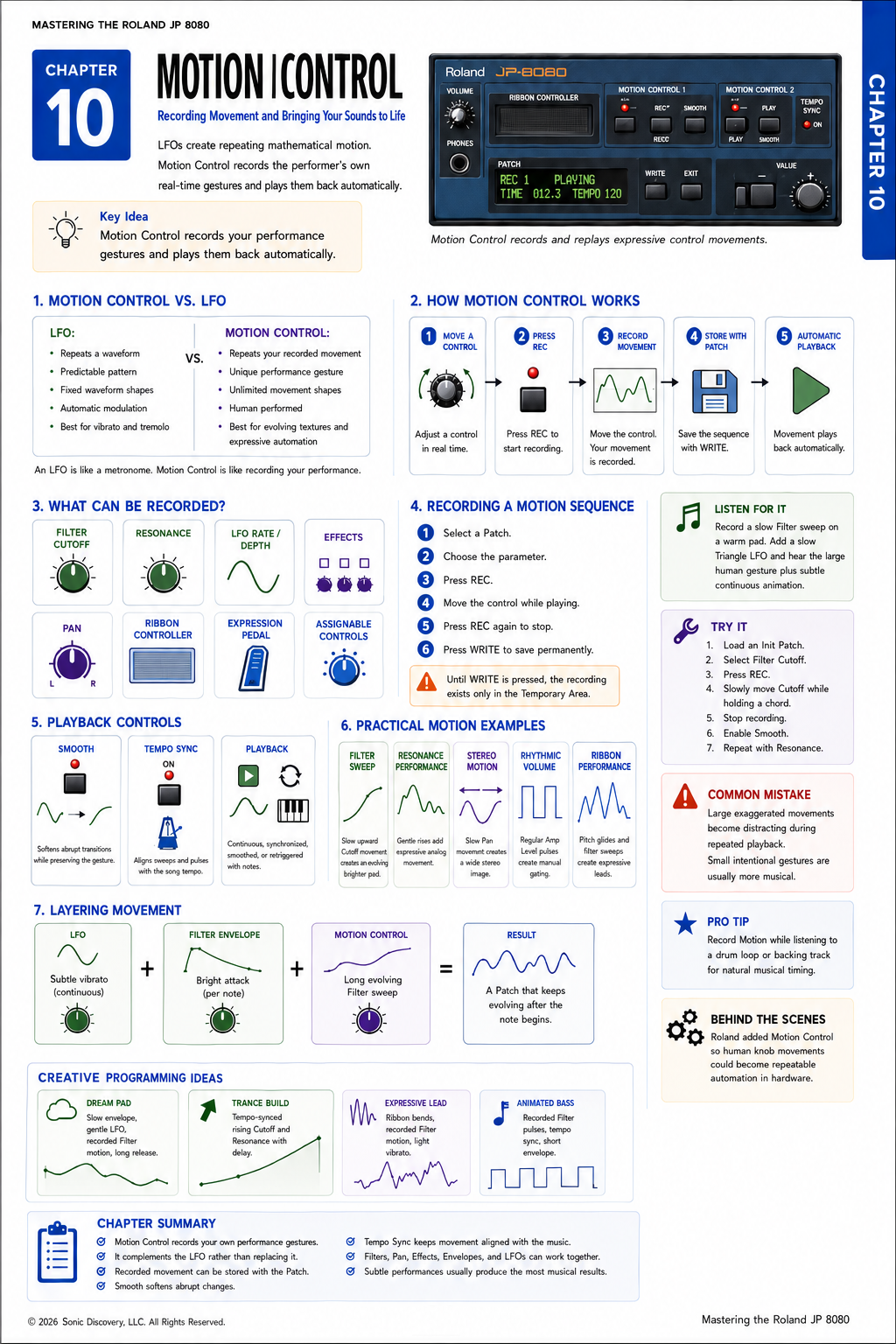
JP-8080 guide / Chapter 10
Motion Control
Recording real time control gestures and replaying them as expressive automation.
Chapter 10
An LFO creates repeating motion. Motion Control records your own performance.
Up to this point, we have explored how the JP-8080 creates sound, shapes it, and adds automatic movement using Envelopes and LFOs. While those tools are incredibly powerful, they share one characteristic: they follow predetermined patterns.
Motion Control is different.
Instead of relying on a fixed waveform or envelope shape, Motion Control records your own knob movements in real time and plays them back automatically. The result is a Patch that evolves exactly as you performed it.
Whether you are slowly opening the Filter, creating rhythmic pulses, or producing dramatic sweeps, Motion Control allows the synthesizer to remember your performance and repeat it every time you play.
This feature was one of the innovations that helped distinguish the JP-8080 from many other virtual analog synthesizers of its time.
Instead of repeating a mathematical waveform like an LFO, Motion Control repeats your own movements. It's like telling the synthesizer how you would move the controls during a live performance.
Motion Control Versus LFO
At first glance, Motion Control and the LFO may seem similar because both create movement. However, they operate very differently.
| Characteristic | LFO | Motion Control |
|---|---|---|
| Movement source | Repeats a waveform | Repeats your recorded movement |
| Pattern | Predictable | A unique performance gesture |
| Shape | Limited to available waveforms | Unlimited movement shapes |
| Character | Automatic | Human performed |
| Best suited for | Vibrato, tremolo, and repeating modulation | Evolving textures and expressive automation |
An LFO is like a metronome. Motion Control is like recording your own performance.
How Motion Control Works
Motion Control follows a simple process:
- Move or select the control you want to automate.
- Press REC.
- Record the movement while you play.
- Store the movement with the Patch.
- Use automatic playback whenever you play the Patch.
Once recorded, your movement becomes part of the Patch. Every time you play the Patch, the recorded motion is available exactly as you performed it.
What Can Be Recorded?
Motion Control can capture movements from several performance controls, including:
- Filter Cutoff
- Resonance
- LFO Rate
- LFO Depth
- Effects parameters
- Pan
- Ribbon Controller
- Expression Pedal when connected
- Assignable Controller movements
Instead of creating motion mathematically, the JP-8080 records the actual control changes.
Recording a Motion Sequence
- Select the Patch. Choose the Patch you wish to edit.
- Choose a parameter. Select the parameter you want to automate, such as Filter Cutoff.
- Begin recording. Press REC. The Motion Control indicator begins recording.
- Perform the movement. Move the selected control naturally while playing. Smooth musical gestures usually produce the most expressive results.
- Stop recording. Press REC again. Your movement is now stored in temporary memory.
- Save the sequence. Press WRITE if you wish to permanently save the Motion sequence with the Patch.
Understanding Playback
Once recorded, Motion Control can replay your performance automatically. Depending on the selected settings, playback can be:
- Continuous
- Tempo synchronized
- Smoothed
- Repeated each time a note is played
This allows complex parameter movements without requiring you to perform them manually every time.
Smooth
Real knob movements sometimes contain abrupt changes. The Smooth control softens those transitions.
Low Smooth values preserve every detail of your original performance. Higher Smooth values create more flowing, natural movement.
Think of Smooth as gently polishing the recorded gesture.
Tempo Synchronization
Motion Control can synchronize to the song tempo. When Tempo Sync is enabled:
- Filter sweeps occur in rhythm.
- Volume pulses match the beat.
- Stereo movement stays aligned with sequenced music.
This feature is especially useful for electronic dance music and live performance.
Practical Motion Examples
| Example | Source | Movement | Result |
|---|---|---|---|
| Filter Sweep | Filter Cutoff knob | Slow upward sweep | An evolving pad that gradually becomes brighter |
| Resonance Performance | Resonance knob | Gentle increases during sustained notes | Expressive analog style filter movement |
| Stereo Motion | Pan | Slow movement from left to right | A wide, evolving stereo image |
| Rhythmic Volume | Amplifier Level | Regular pulses | Manual gating that differs from traditional LFO tremolo |
| Ribbon Performance | Ribbon Controller | Pitch glides and Filter sweeps | Highly expressive lead sounds |
Combining Motion Control with Other Modulation
One of the greatest strengths of the JP-8080 is that Motion Control works alongside other modulation sources.
Imagine this combination:
- The LFO creates a slow vibrato.
- The Filter Envelope produces a bright attack.
- Motion Control gradually opens the Filter over several measures.
The result is a Patch that continues evolving long after the note begins. Each modulation source contributes a different layer of movement. Together they create sounds that feel remarkably alive.
Listen for It
- Load a warm pad.
- Record a slow Filter sweep using Motion Control.
- Play a sustained chord and notice how the Filter opens exactly as you performed it.
- Enable a slow Triangle LFO on the Filter.
- Listen as Motion Control provides the large evolving movement while the LFO adds subtle continuous animation.
The combination feels much more natural than either modulation source alone.
Try It
- Load an Init Patch.
- Select the Filter Cutoff.
- Press REC.
- Slowly rotate the Cutoff knob while holding a chord.
- Stop recording.
- Play several notes.
- Enable Smooth and compare the playback.
- Repeat the exercise using Resonance instead of Cutoff.
Notice how each recorded gesture creates a completely different musical result.
Common Mistake
Many beginners record large, exaggerated knob movements. Although impressive at first, these movements often become distracting after repeated playback.
Think like a performer. Small, intentional gestures usually create more expressive and reusable Patches. Subtle movement often sounds more professional than dramatic movement.
Programming Tip
Record your Motion sequence while listening to a drum loop or backing track. Natural musical timing almost always produces better results than recording in silence.
Even if the movement is not perfectly synchronized, it will feel more like a human performance.
Behind the Scenes
Why did Roland include Motion Control?
Traditional LFOs are excellent for creating repeated modulation, but they cannot capture human expression. Roland wanted performers to interact with the synthesizer in a more musical way.
By allowing knob movements to be recorded and replayed, the JP-8080 became capable of producing evolving performances that would otherwise require constant hands on control.
Today, many software synthesizers include automation recording as a standard feature. The JP-8080 introduced this concept many years earlier in hardware form, making it one of the coolest forward thinking aspects of its design.
Creative Programming Ideas
| Patch idea | Programming elements | Result |
|---|---|---|
| Dream Pad | Slow Filter Envelope, gentle Triangle LFO, recorded Filter Motion, and long Release | A continuously evolving ambient pad |
| Trance Build | Tempo synchronized Motion Control, increasing Filter Cutoff, rising Resonance, and Delay | A classic dance music build up |
| Expressive Lead | Ribbon Controller pitch bends, recorded Filter movement, and light LFO vibrato | A solo Patch that feels responsive and expressive |
| Animated Bass | Recorded Filter pulses, tempo synchronized playback, and a short Envelope | A rhythmic bass Patch that complements a sequencer |
Chapter Summary
- Motion Control records your own performance gestures.
- It complements the LFO rather than replacing it.
- Recorded movements can be stored with the Patch.
- Smooth softens abrupt changes.
- Tempo Sync keeps Motion Control aligned with the music.
- Motion Control works especially well with Filters, Resonance, Pan, and Effects.
- Combining Motion Control with Envelopes and LFOs creates rich, evolving sounds.
- Thoughtful, subtle performances usually produce the most musical results.