
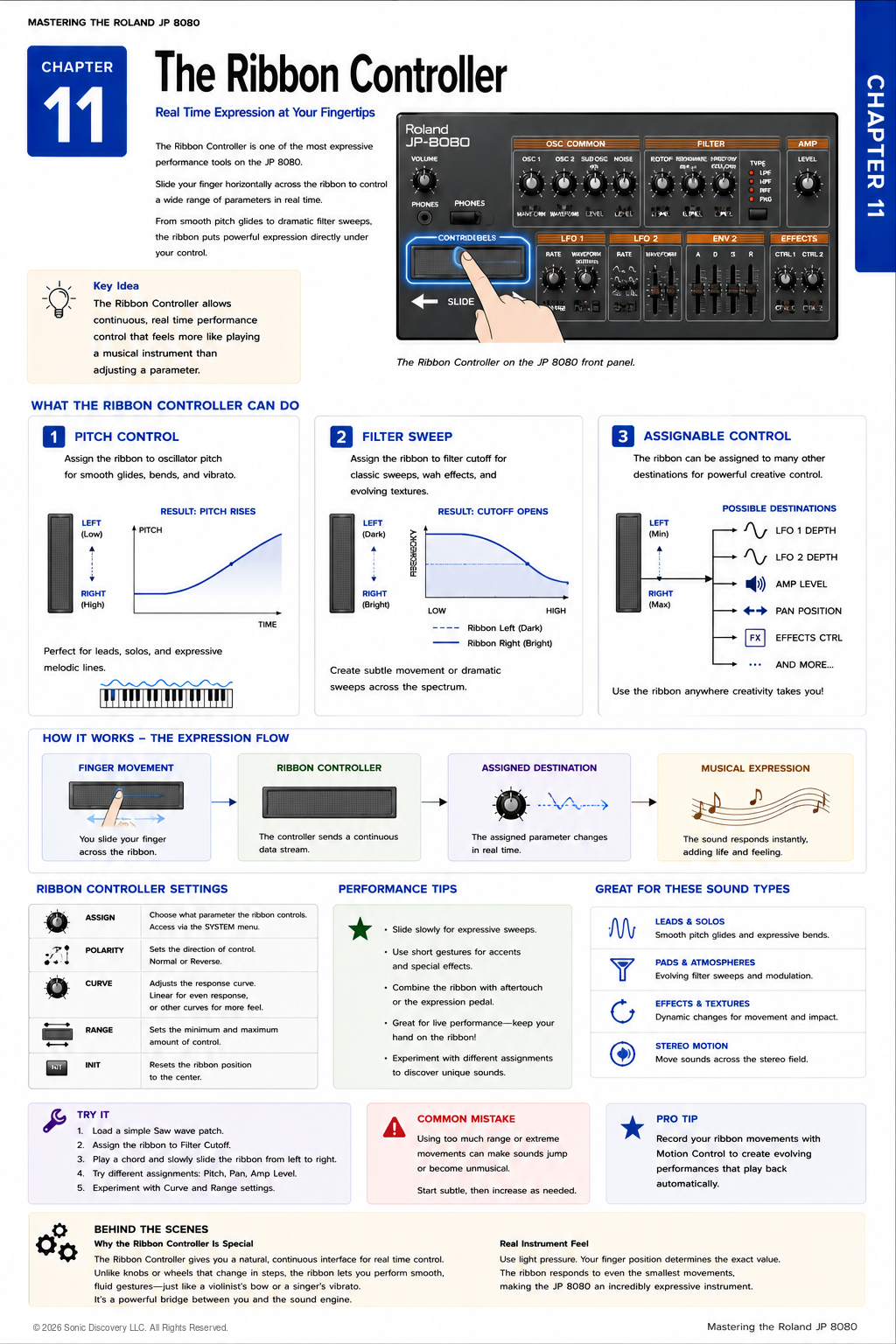
JP-8080 guide / Chapter 11
The Ribbon Controller
External MIDI expression for the JP-8080 using the JP-8000 ribbon or another compatible controller.
Chapter 11
A synthesizer becomes more expressive when it responds to the performer.
The JP-8080 does not have a built in ribbon controller. Its rack format removes the keyboard and ribbon hardware found on the Roland JP-8000, but the JP-8080 can still respond expressively to MIDI messages from an external controller.
The JP-8000 is the most closely related example. Its ribbon controller can transmit Aftertouch from the right side and Breath Controller messages from the left side. The JP-8080 can use those messages through its Control Assign system.
This chapter therefore focuses on external ribbon control. The same general principles can also apply to another keyboard, ribbon controller, touch surface, or MIDI device capable of transmitting a compatible message.
The Hardware Distinction
The JP-8000 is a keyboard synthesizer with an assignable ribbon controller. The JP-8080 is a rack module and has no ribbon surface of its own. This distinction is important because the JP-8080 does not read finger position directly.
Instead, the external controller reads the gesture and transmits MIDI data. The JP-8080 receives that data and applies the parameter changes stored in its Control Assign configuration.
The Expression Flow
- You touch or move across the ribbon on an external controller.
- The external device converts the gesture into a MIDI message.
- The message reaches the JP-8080 through the MIDI connection.
- Control Assign changes one or more programmed parameters.
- The sound responds in real time.
The ribbon is not part of the audio signal path. It generates control data rather than sound.
The JP-8000 Ribbon as a Controller
Roland designed the JP-8000 ribbon to provide two useful MIDI control sources:
- Right side: Aftertouch messages
- Left side: Breath Controller messages
This arrangement makes the JP-8000 a natural performance controller for the JP-8080. Touching either side can produce a different control stream, allowing two contrasting tonal movements without adding separate hardware controls.
Using Other Ribbon Controllers
A third party ribbon or another synthesizer can also be useful, but its behavior may differ from the JP-8000. Some ribbons transmit Pitch Bend, Channel Aftertouch, Breath Controller, Modulation, or an assignable Control Change message. Some use the whole surface as one continuous range, while others provide separate zones.
Before programming the JP-8080, determine exactly what message the external controller transmits. Do not assume that every ribbon sends the same data or returns to the same value when released.
Understanding Control Assign
Control Assign allows an incoming MIDI source to change multiple JP-8080 parameters at the same time. This is more powerful than assigning a controller to only one conventional destination.
For example, one gesture could open the Filter, increase Resonance, raise LFO Depth, and add Effects Level together. The amount and direction of change can be different for each selected parameter.
Aftertouch and Breath Controller are the most direct sources for the JP-8000 ribbon. The JP-8080 also provides Control Up and Control Down settings so other compatible MIDI messages can be selected when necessary.
Control Up and Control Down
Control Up and Control Down identify the two incoming control sources used by Control Assign. Their names describe two control pathways, not physical movement across a ribbon.
The message selections for Control Up and Control Down apply across the JP-8080. The actual parameter movements created with Control Assign belong to the sound programming context, so save the appropriate Patch after creating an assignment you want to retain.
Parameters You Can Shape
Control Assign can create coordinated movement across many front panel sound parameters. Useful possibilities include:
- Oscillator pitch and related oscillator controls
- Filter Cutoff and Resonance
- Filter Envelope or Amplifier Envelope settings
- LFO rate and modulation depth
- Amplifier Level and Pan
- Effects parameters
The best destination is determined by the musical purpose of the Patch. A ribbon gesture does not need to produce a dramatic change. Small ranges often feel more playable and controlled.
Practical Assignment Ideas
| Application | JP-8080 destinations | Musical result |
|---|---|---|
| Expressive Lead | Pitch, LFO Depth, and Delay Level | Controlled bends with vibrato and ambience |
| Sweeping Pad | Filter Cutoff, Resonance, and Effects Level | A gradual change from dark to bright and spacious |
| Rhythmic Texture | LFO Rate, LFO Depth, and Delay Feedback | Movement that becomes more animated during a phrase |
| Stereo Motion | Pan and Effects Level | Sound that shifts across the stereo field |
Basic Setup Workflow
- Connect the MIDI OUT of the external controller to the JP-8080 input used by your performance setup.
- Match the controller and JP-8080 MIDI channels.
- Confirm which message the ribbon transmits.
- Select the Patch and Part you want to program.
- Use Control Assign to define the destination parameters and their ranges.
- Move the ribbon while playing and refine the ranges by ear.
- Save the Patch when the response feels musical.
When the external controller serves as the playing keyboard, the JP-8080 Remote Keyboard connection and settings may be useful. Follow the MIDI routing appropriate to your equipment and confirm that note and controller messages reach the intended Part.
Try It: Filter Expression
- Load a sustained Patch with a moderately closed Filter.
- Use Aftertouch or Breath Controller as the incoming Control Assign source.
- Program a modest increase in Filter Cutoff.
- Hold a chord and move across the external ribbon slowly.
- Add a small amount of Resonance or Effects Level to the same gesture.
- Reduce any range that causes the sound to jump abruptly.
This exercise demonstrates the central advantage of Control Assign: one external gesture can shape several related parameters as a single musical movement.
Combining External Control with Motion Control
External ribbon control and Motion Control serve different purposes. The ribbon follows the performer in real time, while Motion Control can replay recorded parameter movements.
They can be combined carefully. For example, Motion Control might provide a repeating Resonance pattern while the external ribbon changes Filter Cutoff and Effects Level. If both systems affect the same parameter, their contributions may combine and produce a larger change than expected.
Common Mistakes
Looking for a ribbon on the JP-8080
The JP-8080 has no built in ribbon surface. The gesture must come from the JP-8000 or another external MIDI controller.
Assuming every ribbon sends the same message
The JP-8000 behavior is specifically documented by Roland. Another ribbon may transmit Pitch Bend, Aftertouch, a Control Change message, or something else. Verify the source before programming Control Assign.
Using ranges that are too large
Extreme ranges can make the sound jump or become difficult to control. Begin with subtle changes, then increase the depth only when the musical result requires it.
Forgetting to save the Patch
After the assignment is working correctly, save the sound so the programmed parameter response is retained.
Performance Tips
- Use slow gestures first so you can hear the complete response range.
- Choose destinations that support one musical intention rather than unrelated changes.
- Keep important level changes conservative to avoid sudden volume jumps.
- Test the Patch at performance volume before using it live.
- Document which external message the Patch expects.
- If using the JP-8000, remember that its left and right ribbon sides provide different messages.
Chapter Summary
- The JP-8080 does not contain a ribbon controller.
- The JP-8000 includes an assignable ribbon that can control the JP-8080 through MIDI.
- The right side of the JP-8000 ribbon transmits Aftertouch, while the left side transmits Breath Controller messages.
- Another external ribbon can work if it sends a compatible message.
- Control Assign converts incoming controller data into coordinated parameter changes.
- Control Up and Control Down can be configured for MIDI sources other than the standard Aftertouch and Breath messages.
- External ribbon control can shape Filter, Pitch, modulation, level, Pan, and Effects parameters.
- Small, purposeful ranges usually produce the most playable results.
- The external controller supplies the gesture; the JP-8080 supplies the programmed response.