
JP-8080 guide / Chapter 09
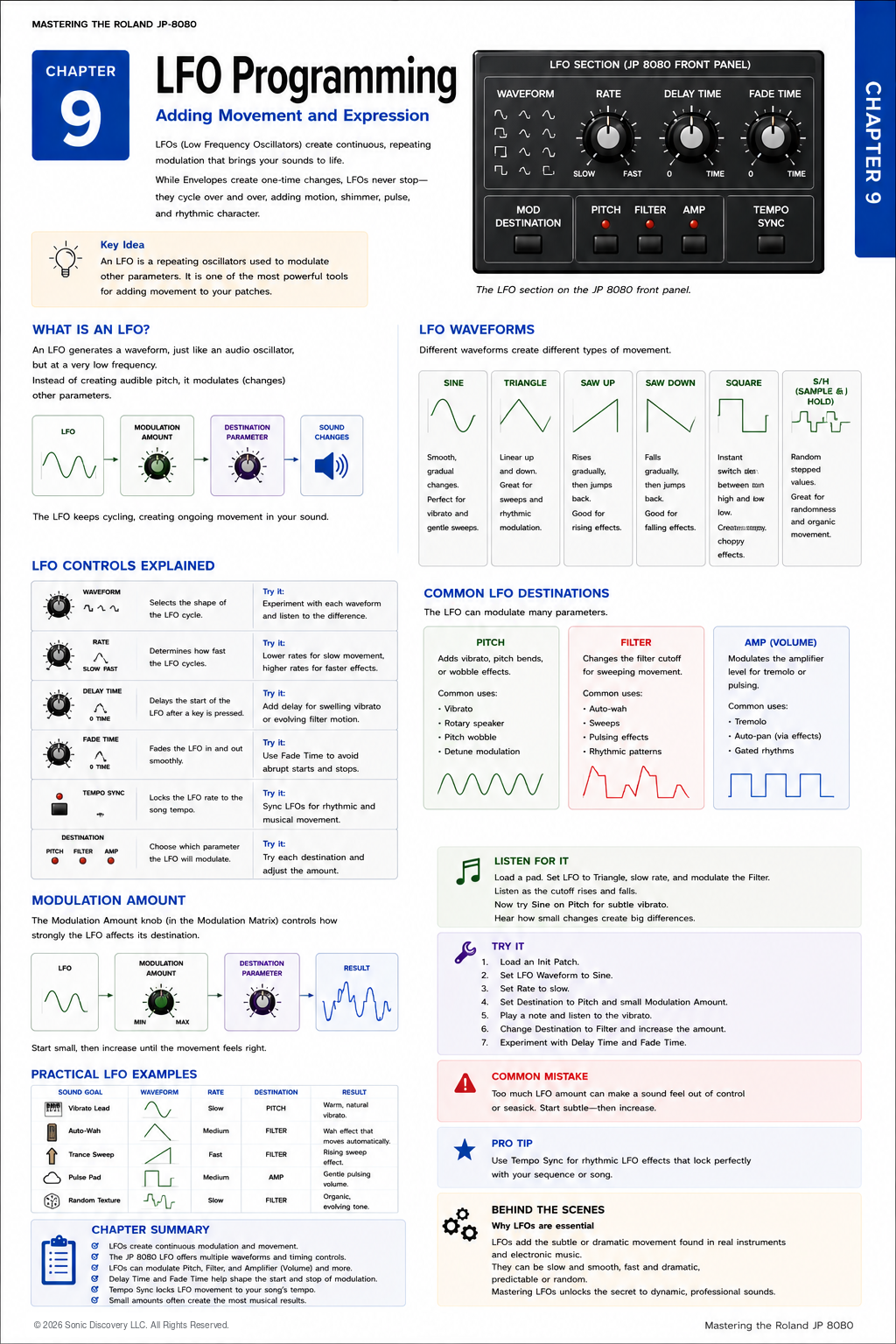
LFO Programming
Waveforms, rate, delay, fade, sync, destinations, and practical movement.
Chapter 9
If Envelopes give a sound its shape, LFOs give it motion.
Until now, we have focused on creating a sound, balancing its components, shaping its tone, and defining how it changes over time. Many of the most recognizable sounds on the JP-8080 have something more: continuous movement.
A pad slowly shimmers. A lead gently vibrates. A filter rhythmically sweeps. A bass pulses with the tempo.
These effects are created by the Low Frequency Oscillator, more commonly known as the LFO.
Unlike the audio oscillators that generate audible sound, an LFO operates at a frequency so low that you do not hear it directly. Instead, it repeatedly changes another parameter, creating motion that can be subtle, dramatic, rhythmic, or unpredictable.
Learning to use the LFO effectively transforms static Patches into expressive instruments.
Instead of generating sound, an LFO repeatedly changes another parameter, such as pitch, filter cutoff, or amplifier level. Think of it as an automatic hand that continuously turns a control knob while you play.
Where the LFO Fits
Unlike the Oscillators or Filter, the LFO is not part of the audio signal path. It is part of the modulation system.
The LFO can send movement to Pitch, Filter, or Amplifier, causing the sound to change without generating an audible signal of its own.
This is an important distinction. The LFO does not create sound. It continuously changes how other parts of the synthesizer behave.
How an LFO Works
Imagine moving the Filter Cutoff knob up and down repeatedly. Now imagine the synthesizer performing that movement automatically.
That is exactly what an LFO does. The movement repeats until you stop playing or disable the modulation. The speed, depth, shape, and timing of that movement are all adjustable.
LFO Waveforms
The waveform determines how the modulation changes over time. Each waveform creates a different musical effect.
| Waveform | Movement | Typical applications |
|---|---|---|
| Sine | Rises and falls with the smoothest possible motion. | Natural vibrato, gentle filter sweeps, evolving pads, and smooth tremolo |
| Triangle | Rises and falls at a constant, predictable rate. | Vintage vibrato, filter modulation, and slow rhythmic movement |
| Saw Up | Rises gradually, then instantly returns to its starting point. | Rising filter sweeps, build ups, experimental modulation, and rhythmic effects |
| Saw Down | Falls gradually, then quickly resets. | Falling sweeps, downward pitch effects, and rhythmic movement |
| Square | Switches instantly between two values without a gradual transition. | Trills, rhythmic gating, chopped filter effects, and electronic pulses |
| Sample and Hold | Generates a sequence of random stepped values. | Random filter movement, computer like effects, experimental textures, and evolving atmospheres |
Sine
The Sine wave is often the best choice when realism is the goal because its gradual movement feels natural and unobtrusive.
Triangle
The Triangle wave is slightly more mechanical than a Sine wave, but remains smooth and predictable. Many classic analog synthesizers relied heavily on Triangle LFOs.
Saw Up and Saw Down
Saw waveforms create movement in one direction followed by an immediate reset. They are especially useful for rhythmic sweeps and dramatic electronic effects.
Square
Because the change is immediate, the Square wave creates distinct two state modulation that works well for rhythmic and stepped effects.
Sample and Hold
Sample and Hold replaces a predictable cycle with random stepped values. Although unpredictable, it can produce remarkably musical results.
Understanding Rate
The Rate control determines how quickly the LFO cycles. Slow rates produce gradual movement. Fast rates create rapid modulation.
| Rate | Character | Useful for |
|---|---|---|
| Slow | One cycle may take several seconds. | Pads, strings, and ambient textures |
| Medium | Clear movement without becoming rapid. | Filter sweeps, gentle tremolo, and moderate vibrato |
| Fast | Rapid modulation that may approach unusual timbral effects. | Electronic effects, pulsing sounds, aggressive modulation, and special effects |
Delay Time
Sometimes you do not want modulation to begin immediately. Delay Time postpones the start of the LFO after a key is pressed.
For example, a note can begin steadily and then develop vibrato after a brief delay. This behavior closely resembles many acoustic instruments.
Fade Time
Fade Time controls how gradually the LFO reaches full strength. Without Fade Time, vibrato begins immediately. With Fade Time, the modulation slowly increases until it reaches its full depth.
This creates a much more natural performance.
Tempo Sync
The JP-8080 can synchronize the LFO to tempo. Instead of moving freely, the LFO locks to rhythmic values such as quarter notes, eighth notes, and sixteenth notes.
Tempo Sync is especially useful for dance music, trance, sequenced bass lines, and rhythmic filter sweeps. Synchronizing movement to tempo helps Patches blend naturally into the arrangement.
Choosing a Destination
The LFO becomes useful only after assigning it to a destination. The destination determines what will move.
| Destination | Result | Typical applications |
|---|---|---|
| Pitch | Produces vibrato or repeating pitch movement. | Natural expression, dramatic pitch bends, and science fiction effects |
| Filter | Repeatedly changes the Cutoff frequency. | Auto wah, sweeping pads, rhythmic motion, and pulsing textures |
| Amplifier | Repeatedly raises and lowers the volume to create tremolo. | Vintage keyboard movement, pulsing sounds, and rhythmic volume effects |
Modulation Amount
The Modulation Amount determines how strongly the LFO affects its destination. Think of it as the depth of the movement.
Small amounts create subtle expression. Large amounts produce obvious modulation. Most professional Patches use surprisingly conservative modulation amounts because subtle movement often sounds more musical than extreme movement.
Combining Parameters
One of the strengths of the JP-8080 is that the LFO parameters work together.
For example, combine a Triangle waveform, slow Rate, long Fade, and Pitch destination to create natural vibrato that gradually develops after each note begins.
Changing only one of these parameters can completely change the musical result.
Practical Examples
| Sound | Waveform | Rate | Destination and amount | Result |
|---|---|---|---|---|
| Gentle Vibrato | Sine | Slow | Pitch with a small amount | Natural expressive movement |
| Auto Wah | Triangle | Medium | Filter with a moderate amount | Smooth repeating filter sweeps |
| Pulsing Pad | Square | Tempo Sync | Amplifier with a medium amount | Rhythmic volume pulses synchronized to the song |
| Trance Sweep | Saw Up | Tempo Sync | Filter with a high amount | Classic electronic build ups |
| Random Texture | Sample and Hold | Slow | Filter with a moderate amount | Organic evolving movement |
Listen for It
- Load a warm pad.
- Select a Triangle LFO and assign it to the Filter.
- Choose a slow Rate and raise the Modulation Amount slightly.
- Play a sustained chord and listen as the brightness slowly rises and falls.
- Switch the destination to Pitch and notice how the same LFO now creates vibrato.
- Add Fade Time and observe how the modulation gently fades in after each note begins.
Try It
- Load an Init Patch.
- Select a Sine LFO.
- Set the Rate to a slow value.
- Assign the destination to Pitch.
- Increase Modulation Amount slightly.
- Play several long notes.
- Add Fade Time.
- Repeat using the Filter as the destination.
Notice how the same LFO produces completely different musical effects depending on the destination.
Common Mistake
Many new programmers immediately increase the Modulation Amount to maximum. The Patch quickly becomes distracting and difficult to control.
Begin with a small amount. Increase the depth only until the movement becomes noticeable. The goal is expression, not exaggeration.
Programming Tip
When programming realistic sounds, imagine how a human performer would naturally introduce expression. A violinist rarely begins every note with full vibrato. Instead, the vibrato gradually develops.
Using both Delay Time and Fade Time recreates this natural performance remarkably well. Small details like these often separate a convincing Patch from an average one.
Behind the Scenes
Why are LFOs so important?
Real acoustic instruments are never perfectly static. A singer’s pitch gently fluctuates. A violinist naturally varies bow pressure. A guitar player introduces vibrato with subtle finger movement.
These continuous changes make performances feel alive. The LFO allows the JP-8080 to recreate those natural variations automatically.
Whether producing gentle vibrato, rhythmic filter sweeps, pulsing pads, or evolving ambient textures, the LFO transforms static electronic sounds into expressive musical performances. It is one of the defining tools of modern synthesizer programming.
Chapter Summary
- LFOs create continuous repeating modulation.
- LFOs do not generate sound.
- The waveform determines the character of the movement.
- Rate controls speed.
- Delay Time postpones modulation.
- Fade Time gradually introduces modulation.
- Tempo Sync locks movement to the song.
- The destination determines what parameter moves.
- Small modulation amounts often produce the most musical results.
- Thoughtful LFO programming adds life, movement, and expression to every Patch.