
JP-8080 guide / Chapter 15
MIDI Implementation
Connections, channels, common setups, parameters, messages, and data flow.
Chapter 15
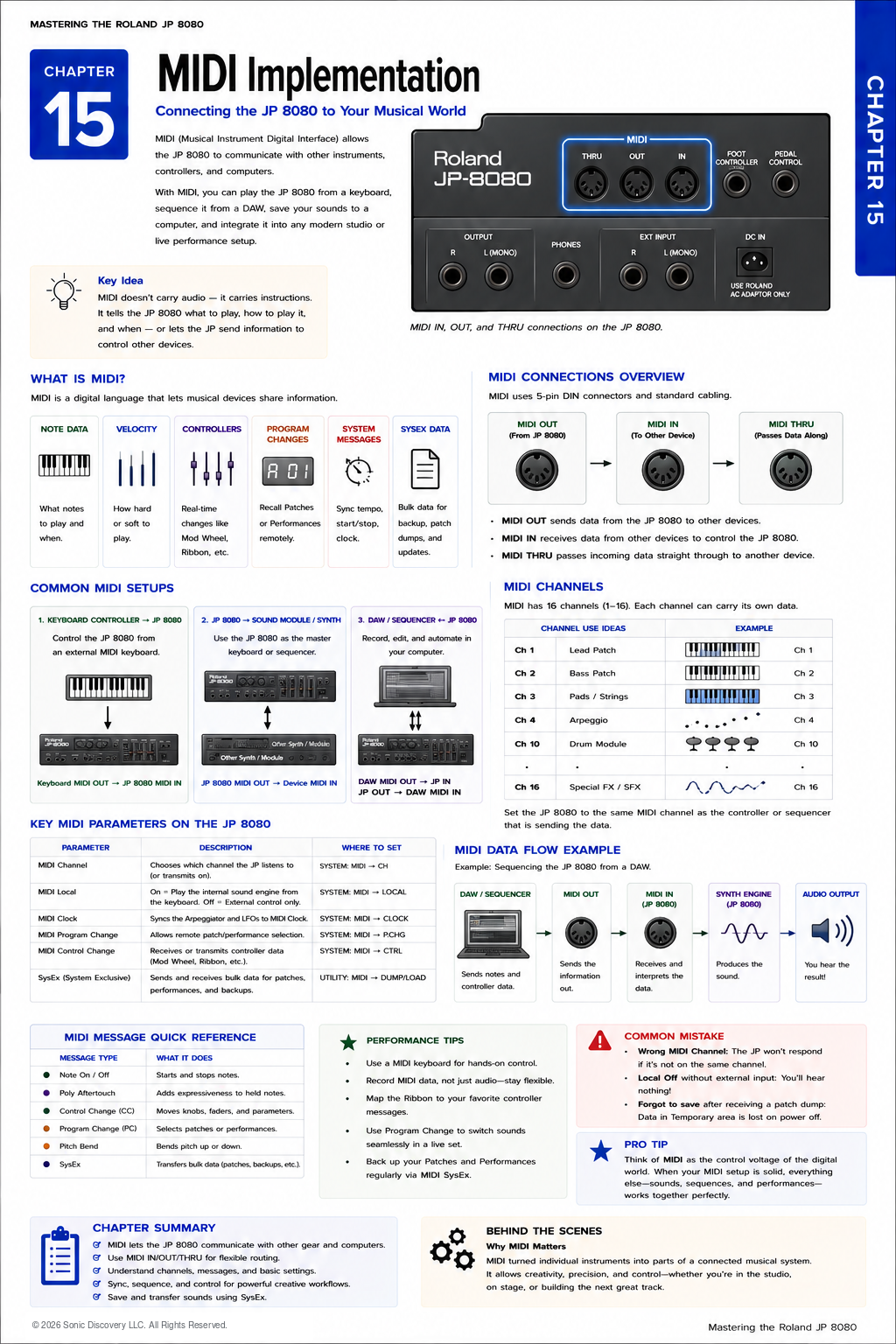
MIDI does not transmit sound. It transmits musical instructions.
One of the greatest strengths of the Roland JP-8080 is that it can communicate with other musical equipment through MIDI, which stands for Musical Instrument Digital Interface.
Whether you are connecting the JP-8080 to a computer, another synthesizer, a MIDI keyboard, a hardware sequencer, or a digital audio workstation, MIDI allows all of these devices to work together as one integrated system.
Many new users assume MIDI carries audio. It does not. Instead, MIDI carries performance information, telling devices what notes to play, when to play them, how hard they were played, and many other performance details.
Understanding MIDI is one of the most valuable skills you can develop because it greatly expands what the JP-8080 can do.
What MIDI Does
MIDI can communicate information such as:
- Which notes are played
- When notes begin and end
- Playing velocity
- Pitch Bend
- Modulation Wheel movement
- Ribbon Controller data
- Program Changes
- Tempo synchronization
- System Exclusive data
None of these are audio signals. They are simply instructions.
MIDI Versus Audio
Understanding this distinction prevents many common setup problems.
| Audio | MIDI |
|---|---|
| Contains actual sound | Contains musical instructions |
| Heard through speakers | Cannot be heard directly |
| Travels through audio cables | Travels through MIDI cables |
| Recorded as sound waves | Recorded as performance data |
| Can be edited only after recording | Can be edited before playback |
Imagine writing sheet music. The sheet music tells a musician what to play. The musician produces the sound. MIDI works in much the same way.
The Three MIDI Connectors
The JP-8080 includes three standard five pin DIN MIDI connectors. Each has a different purpose.
| Connector | Purpose | Typical use |
|---|---|---|
| MIDI IN | Receives MIDI information from another device | A MIDI keyboard, DAW, hardware sequencer, or another synthesizer controls the JP-8080 |
| MIDI OUT | Sends information generated by the JP-8080 | Transmits notes, controller movements, Program Changes, Motion Control data, and Ribbon Controller movements |
| MIDI THRU | Passes incoming MIDI information to another device without changing it | Allows a keyboard to play the JP-8080 and a second synthesizer from the same performance |
MIDI THRU makes it easy to build larger MIDI systems.
MIDI Channels
MIDI provides sixteen independent channels. Think of them as sixteen separate communication lanes. Each device listens only to the channel it has been assigned.
| Channel | Instrument or role |
|---|---|
| Channel 1 | JP-8080 Lead |
| Channel 2 | Bass Synth |
| Channel 3 | Pad Synth |
| Channel 10 | Drum Machine |
Although all information travels through the same cable, each instrument responds only to its assigned channel.
Local Control
One of the most important MIDI settings is Local Control.
| Setting | Behavior | When to use it |
|---|---|---|
| Local ON | The keyboard directly controls the JP-8080 sound engine | Normal operation |
| Local OFF | The keyboard sends data through MIDI OUT to a computer or sequencer, which returns it through MIDI IN to the JP-8080 | Computer sequencing, where it prevents notes from being triggered twice |
Many beginners accidentally disable Local Control and think their synthesizer has stopped working.
Important MIDI Messages
| Message | What it communicates | Why it matters |
|---|---|---|
| Program Change | Selects different Patches or Performances automatically | A sequencer can load the correct sound instantly during a live concert |
| Control Change | Transmits movements from Volume, Sustain Pedal, Expression, Modulation Wheel, Ribbon Controller, and assignable controllers | Records expressive performance movements for precise playback |
| Pitch Bend | Transmits continuous pitch changes | Useful for guitar style bends, expressive solos, and Synth Leads |
| MIDI Clock | Provides external timing information | Keeps the Arpeggiator, synchronized LFOs, Delay effects, and Motion Control aligned with the studio |
| System Exclusive | Transfers detailed information specific to the instrument | Supports Patch, Performance, complete memory, and system setting backups |
Program Change
Program Change messages allow external devices to select different Patches or Performances automatically. During a live concert, a sequencer can send a Program Change so the JP-8080 instantly loads the correct Patch. This makes live performances much smoother.
Control Change Messages
Control Change messages, often called CC messages, transmit movements of performance controllers. These messages allow performances to be recorded with all of their expressive movements.
Pitch Bend
Pitch Bend messages transmit smooth pitch changes. Unlike ordinary note messages, Pitch Bend provides continuous movement. T he data can be recorded by a DAW and played back exactly as performed.
MIDI Clock
Many JP-8080 features depend upon timing, including the Arpeggiator, tempo synchronized LFOs, Delay effects, and Motion Control synchronization.
Rather than using its own internal tempo, the JP-8080 can follow an external MIDI Clock. When synchronized, every rhythmic feature stays perfectly aligned with the rest of the studio.
System Exclusive
One of the most powerful MIDI features is System Exclusive, commonly called SysEx. Unlike ordinary MIDI messages, SysEx carries detailed information specific to one manufacturer or instrument.
For the JP-8080, SysEx can transfer:
- Individual Patches
- Performances
- Entire memory backups
- System settings
This makes SysEx essential for archiving sounds, exchanging Patches, restoring backups, and preserving original programming.
Throughout this handbook, we have emphasized the importance of saving your work. SysEx provides one of the safest ways to preserve it. A dedicated chapter later in this handbook explores SysEx in greater detail.
Connecting to a Computer
A common studio setup sends MIDI from the computer or DAW through a USB MIDI interface and into the JP-8080 MIDI IN connector.
The DAW sends MIDI data to the synthesizer. The synthesizer generates the sound. The audio outputs are then connected to an audio interface for recording.
Practical Examples
| Setup | Connection | Result |
|---|---|---|
| External Keyboard | Keyboard MIDI OUT to JP-8080 MIDI IN | The external keyboard plays the JP-8080 |
| Recording a Performance | JP-8080 MIDI OUT to computer | Every note and controller movement is recorded |
| Sequencing | Computer MIDI OUT to JP-8080 MIDI IN | The DAW performs the synthesizer automatically |
| Two Synthesizers | Keyboard to JP-8080, then MIDI THRU to a second synthesizer | Both instruments play together |
Listen for It
- Connect the JP-8080 to your DAW using a MIDI interface.
- Record a short melody and play it back.
- Notice that the computer is sending performance instructions rather than audio.
- Change the Patch on the JP-8080.
- Play the recording again.
The melody remains identical, but the sound changes completely. This demonstrates one of MIDI's greatest advantages: performance data and sound selection remain independent.
Try It
- Connect the JP-8080 to a DAW.
- Record a simple melody.
- Change to a different Patch.
- Play the sequence again.
- Record a Pitch Bend.
- Add Ribbon Controller movements.
- Record Modulation Wheel changes.
- Compare the playback.
Notice that every expressive gesture is reproduced exactly.
Common Mistake
Many new users confuse MIDI cables with audio cables. Connecting only MIDI cables produces no audible sound.
The JP-8080 still requires its audio outputs to be connected to speakers, headphones, or an audio interface.
Always remember: MIDI carries instructions. Audio carries sound.
Programming Tip
Think of MIDI as your performance and audio as your final recording.
When working with a DAW, record the MIDI performance first. This allows you to correct wrong notes, change the tempo, edit controller movements, try different Patches, and perfect the performance.
Once everything sounds right, record the JP-8080's audio outputs. This workflow provides maximum flexibility.
Behind the Scenes
Why has MIDI remained the industry standard for decades?
MIDI was introduced in the early 1980s to solve a simple but important problem. Musical instruments from different manufacturers could not communicate with one another.
By establishing a universal language for musical performance data, MIDI allowed keyboards, synthesizers, drum machines, sequencers, and computers to work together regardless of brand.
Roland was one of the original companies that embraced the MIDI standard, and the JP-8080 continues that tradition by offering comprehensive MIDI implementation that integrates seamlessly into vintage hardware studios and modern computer based production environments.
Even decades after its introduction, MIDI remains one of the foundations of electronic music production.
Creative Programming Ideas
| Workflow | Components | Result |
|---|---|---|
| Live Performance Setup | External MIDI Controller, JP-8080, second sound module through MIDI THRU, Foot Controller, and Program Changes | Instant sound changes throughout a live performance |
| Studio Workflow | DAW sequencing, MIDI recording, audio recording after editing, and SysEx backups | A flexible production workflow with complete recall of performances |
| Layered Synths | JP-8080 on Channel 1, Analog Synth on Channel 2, and Digital Pad on Channel 3 | Rich layered textures controlled from a single keyboard |
| Motion Recording | Ribbon Controller, Pitch Bend, Modulation Wheel, and MIDI Clock synchronization | Expressive performances that can be edited and replayed with precision |
Chapter Summary
- MIDI carries performance instructions, not audio.
- MIDI IN receives information.
- MIDI OUT transmits information.
- MIDI THRU forwards incoming data to additional devices.
- Sixteen MIDI channels allow multiple instruments to communicate independently.
- Local Control determines whether the keyboard directly plays the internal sound engine.
- Program Changes automate Patch and Performance selection.
- Control Change messages capture expressive controller movements.
- MIDI Clock synchronizes timing based features.
- SysEx allows complete Patch and Performance backup and restoration.
- MIDI is the foundation of modern studio integration and live performance.