
JP-8080 guide / Chapter 12
The Arpeggiator
Modes, rates, range, octave shift, swing, hold, and practical patterns.
Chapter 12
One chord can become an entire musical performance.
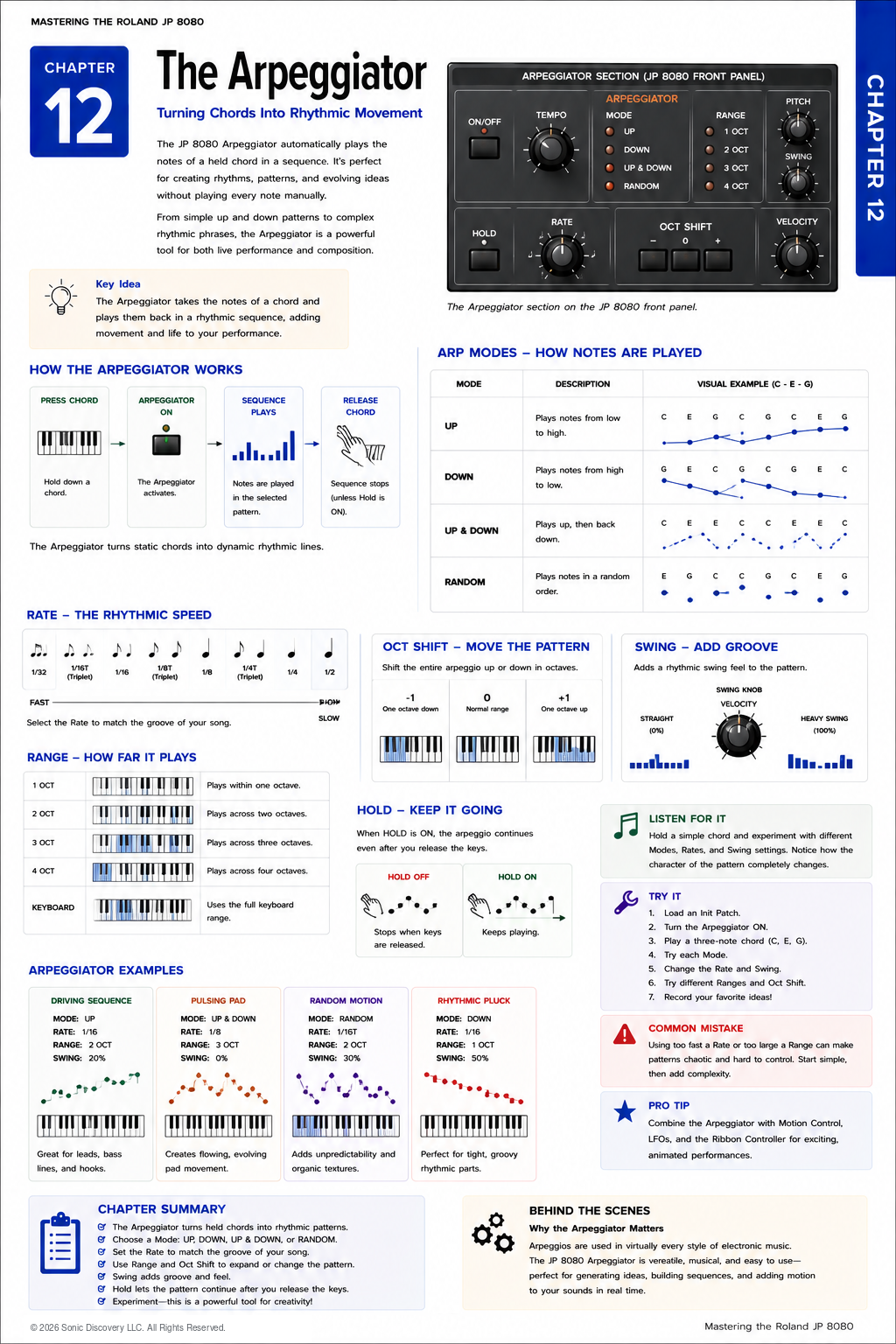
The Roland JP-8080 includes a powerful Arpeggiator that transforms held notes or chords into repeating rhythmic patterns. While it is easy to think of the Arpeggiator as simply playing notes one after another, it is much more than that. It is both a performance tool and a source of musical inspiration.
Many iconic electronic music sequences were created by holding only a few notes while the Arpeggiator generated a rhythmic pattern. Combined with the JP-8080's Motion Control, LFOs, Ribbon Controller, and effects, these simple patterns can become evolving performances that feel alive.
Whether you are creating driving trance bass lines, shimmering ambient textures, rhythmic pads, or experimental sequences, the Arpeggiator is one of the fastest ways to bring movement into your music.
Instead of hearing all the notes at once, the synthesizer performs them individually according to the selected playback mode and tempo. Think of it as an automatic performer that continuously plays the notes you are holding.
Where the Arpeggiator Fits
Unlike the Oscillators, Filter, or Amplifier, the Arpeggiator is not part of the audio signal path. It controls which notes are played and when they are played.
- Play notes or a chord on the keyboard.
- The Arpeggiator determines note order, rhythm, and timing.
- The resulting notes are sent to the sound engine.
- The sound engine produces the audio output.
The Arpeggiator determines the timing of the notes. The synthesizer engine determines how those notes sound.
How the Arpeggiator Works
Suppose you play a C Major chord. Normally, you would hear C, E, and G at the same time.
With the Arpeggiator enabled, the JP-8080 plays those notes one after another. A simple pattern might be C, E, G, C, E, G, repeating continuously until you release the keys.
Changing the playback mode changes the order of the notes. Changing the tempo changes the speed.
Playback Modes
The playback mode determines the order in which the held notes are played.
| Mode | How it plays | Example using C, E, and G | Musical character |
|---|---|---|---|
| Up | Lowest note to highest | C, E, G, C, E, G | The most common mode and a natural starting point |
| Down | Highest note to lowest | G, E, C, G, E, C | A descending feel from the same held notes |
| Up and Down | Ascends and then descends | C, E, G, E, C | Smooth, flowing patterns |
| Random | Selects held notes unpredictably | The order changes with each repetition | Ambient, soundtrack, experimental, and generative textures |
| As Played | Repeats the order in which notes were pressed | Press G, then C, then E to hear G, C, E | Captures the performer's playing style |
Tempo
The tempo determines how quickly the Arpeggiator plays the notes. A slower tempo creates spacious musical phrases. A faster tempo creates energetic sequences.
The JP-8080 can operate using:
- Internal Tempo
- External MIDI Clock
When synchronized to an external sequencer or DAW, the Arpeggiator remains aligned with the rest of the music.
Note Values
The Arpeggiator can divide the beat into different rhythmic values, including:
- Quarter Notes
- Eighth Notes
- Eighth Note Triplets
- Sixteenth Notes
Changing only the note value dramatically changes the feel of a performance. A simple chord can become either a slow ambient texture or a driving dance sequence.
Octave Range
The Octave Range determines how many octaves the Arpeggiator spans before repeating.
| Range | Pattern behavior | Musical result |
|---|---|---|
| One Octave | The pattern repeats within the played notes | A focused pattern such as C, E, G, then C, E, G |
| Two Octaves | The pattern expands into the next octave | A broader sequence that moves through C, E, G and then the higher C, E, G |
| Three or More Octaves | The notes cascade across a wide range | Exciting sequences associated with trance and electronic music |
Gate Time
Gate Time determines how long each note is held before the next note begins.
| Setting | Character | Useful for |
|---|---|---|
| Short Gate | Tight, separated, and percussive | Staccato sequences, percussive rhythms, and tight bass lines |
| Long Gate | Smooth, connected, and sustained | Flowing patterns, legato movement, and ambient sequences |
Small adjustments to Gate Time can dramatically change the groove.
Accent
Some Arpeggiator patterns support Accent, emphasizing selected notes. This creates a more musical and less mechanical performance.
Used carefully, Accent can simulate the natural dynamics of a human player.
Hold Function
The Hold function allows the Arpeggiator to continue playing after you release the keys. This frees both hands for:
- Ribbon Controller performance
- Motion Control recording
- Filter adjustments
- Effect changes
- Playing additional instruments
Hold is one of the most useful live performance features on the JP-8080.
Combining with Motion Control
The Arpeggiator becomes significantly more powerful when combined with Motion Control. Imagine this layered performance:
- The Arpeggiator repeats the notes.
- Motion Control gradually opens the Filter.
- The LFO introduces subtle vibrato.
- The Ribbon Controller adds expressive sweeps.
Although the chord never changes, the sound continues evolving. This layered approach is one of the hallmarks of classic JP-8080 programming.
Practical Examples
| Example | Mode | Rate | Octave Range | Gate and movement | Result |
|---|---|---|---|---|---|
| Classic Trance Sequence | Up | Sixteenth Notes | Two | Medium Gate | A driving electronic sequence |
| Ambient Pattern | Random | Quarter Notes | One | Long Gate | Slow, evolving textures |
| Berlin School Style | Up and Down | To taste | Three | Medium Gate with recorded Filter Motion | Long, evolving analog style sequences |
| Rhythmic Pad | As Played | Eighth Notes | One | Long Gate | Gentle rhythmic accompaniment |
| Dance Bass | Up | Sixteenth Notes | One | Short Gate with a Motion Control Filter sweep | An energetic dance bass line |
Listen for It
- Load a bright Saw wave Patch.
- Enable the Arpeggiator and hold a simple three note chord.
- Select Up mode and listen carefully.
- Switch to Random and notice how the same chord creates a different musical experience.
- Increase the Octave Range and listen as the pattern becomes larger and more energetic.
- Shorten the Gate Time and hear the sequence become tighter and more percussive.
Try It
- Load an initialized Patch.
- Enable the Arpeggiator.
- Select Up mode.
- Set the tempo to a comfortable speed.
- Hold a C minor chord.
- Increase the Octave Range from one to three.
- Shorten the Gate Time.
- Record a slow Filter sweep using Motion Control.
- Add a gentle Triangle LFO to the Filter.
Notice how each feature contributes a different layer of movement.
Common Mistake
Many new users focus only on changing the playback mode. While the playback mode is important, much of the musical character comes from the interaction between:
- Gate Time
- Tempo
- Octave Range
- Motion Control
- Filter programming
Experiment with all of these together rather than changing only one parameter.
Programming Tip
Try programming the Patch first, then enable the Arpeggiator. A well designed sound usually produces a more interesting sequence than relying on the Arpeggiator alone.
Many classic electronic performances use relatively simple note patterns but highly expressive sound design.
Behind the Scenes
Why did Roland include such a flexible Arpeggiator?
Roland recognized that electronic musicians often think rhythmically as well as harmonically. By integrating an Arpeggiator directly into the synthesizer, performers could generate complex musical patterns without requiring an external sequencer.
This encouraged experimentation and made the JP-8080 particularly attractive for live performance.
The ability to combine the Arpeggiator with Motion Control, synchronized LFOs, the Ribbon Controller, and external MIDI timing helped establish the instrument as a favorite among trance, techno, ambient, and electronic music producers.
Creative Programming Ideas
| Patch idea | Programming elements | Result |
|---|---|---|
| Supersaw Anthem | Two octave Up pattern, Sixteenth Notes, slow Filter Motion, Chorus, and Delay | A wide, energetic trance sequence |
| Evolving Atmosphere | Random mode, Long Gate, slow LFO, Motion Controlled Resonance, and Reverb | A constantly changing ambient soundscape |
| Cinematic Pulse | Up and Down mode, three octaves, tempo synchronized Delay, and a gentle Filter Envelope | A rhythmic texture suitable for film scoring |
| Live Performance Patch | Hold enabled, Ribbon assigned to Filter Cutoff, Motion Control on Effects Mix, and LFO on Pan | An evolving performance that can be shaped continuously in real time |
Chapter Summary
- The Arpeggiator converts held chords into repeating note patterns.
- Playback Mode determines the order of the notes.
- Tempo controls playback speed.
- Note Value determines rhythmic resolution.
- Octave Range expands the pattern across multiple octaves.
- Gate Time controls note length and groove.
- Hold allows the sequence to continue after releasing the keys.
- The Arpeggiator works exceptionally well with Motion Control, LFOs, and the Ribbon Controller.
- A simple chord can become a complex musical performance through thoughtful programming.