
JP-8080 guide / Chapter 02
Understanding the JP-8080 Memory System
Temporary memory, User Patch memory, User Performance memory, and what happens when you edit or press Write.
Chapter 2
If there is one concept that causes the most confusion for new JP-8080 owners, it is the memory system. Fortunately, Roland's design is actually very logical once you understand it.
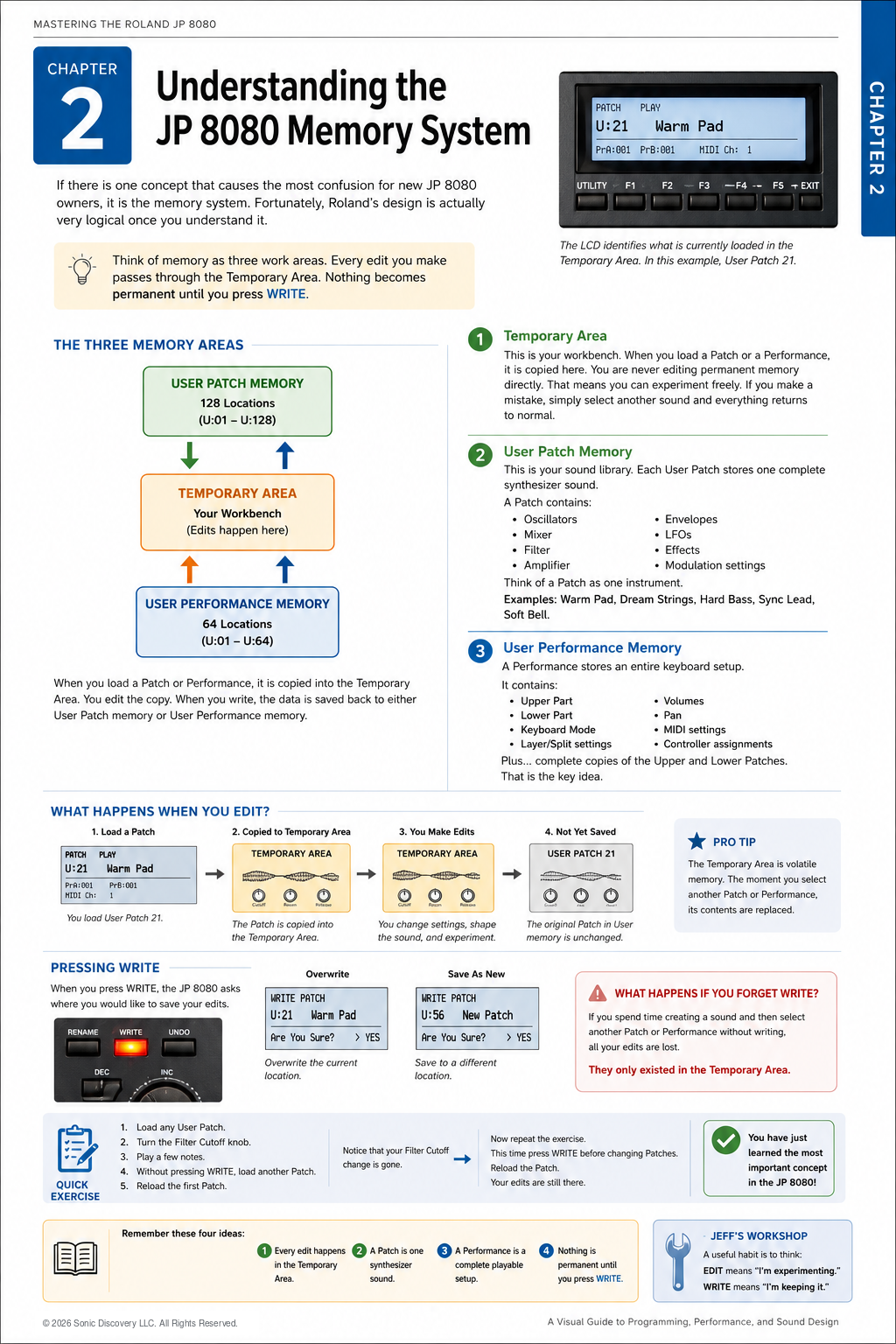
Instead of thinking about memory as a collection of files, think of it as three work areas. The Temporary Area is the center of everything. Every edit you make passes through it. Nothing becomes permanent until you press WRITE.
The Three Memory Areas
1. Temporary Area
Think of this as your workbench. When you load a Patch or a Performance, it is copied here.
You are never editing permanent memory directly. Instead, you are editing a temporary copy. That means you can experiment freely. If you make a mistake, simply select another sound and everything returns to normal.
2. User Patch Memory
This is your sound library. Each User Patch stores one complete synthesizer sound.
A Patch contains:
- Oscillators
- Mixer
- Filter
- Amplifier
- Envelopes
- LFOs
- Effects
- Modulation settings
Think of a Patch as one instrument. Examples include Warm Pad, Dream Strings, Hard Bass, Sync Lead, and Soft Bell. Each is an individual sound.
3. User Performance Memory
A Performance stores an entire keyboard setup. It contains:
- Upper Part
- Lower Part
- Keyboard Mode
- Layer and Split settings
- Volumes
- Pan
- MIDI settings
- Controller assignments
- Complete copies of the Upper and Lower Patches
That final point is the key idea: a Performance stores the complete playable setup.
Visualizing the Difference
| Patch | Performance |
|---|---|
| Oscillator, Filter, Amplifier, Effects, and other sound settings | Upper Patch, Lower Patch, Layer or Split settings, volumes, controllers, MIDI settings, and more |
| One sound | A complete instrument |
What Happens When You Edit?
Imagine that you load User Patch 21, “Warm Pad.” The JP-8080 copies it into the Temporary Area.
You increase Filter Cutoff, add Resonance, and increase Release Time. At this moment, nothing has been permanently changed. Only the Temporary Area contains those edits.
Pressing WRITE
When you press WRITE, the JP-8080 asks where you would like to save the sound. You can overwrite User Patch 21 or save the edited sound as a new Patch, such as User Patch 56.
It works much like saving a document on a computer.
What Happens If You Forget WRITE?
Suppose you spend twenty minutes creating a beautiful pad and then accidentally select another Patch. Your edits disappear because they existed only inside the Temporary Area. Nothing had been written to User Memory.
Quick Exercise
- Load any User Patch.
- Turn the Filter Cutoff knob.
- Play a few notes.
- Without pressing WRITE, load another Patch.
- Reload the first Patch.
Notice that your Filter Cutoff change is gone.
Now repeat the exercise. This time, press WRITE before changing Patches. Reload the Patch and your edits are still there.
You have now learned the most important concept in the JP-8080 memory system.
Programming Tip
A useful habit is to think of EDIT as “I'm experimenting” and WRITE as “I'm keeping it.” That simple mental model prevents most memory related mistakes.
Chapter Summary
- Every edit happens in the Temporary Area.
- A Patch is one synthesizer sound.
- A Performance is a complete playable setup.
- Nothing is permanent until you press WRITE.