
JP-8080 guide / Chapter 03
The Temporary Area
Your workbench for editing, the data it contains, and how to avoid losing unwritten changes.
Chapter 3
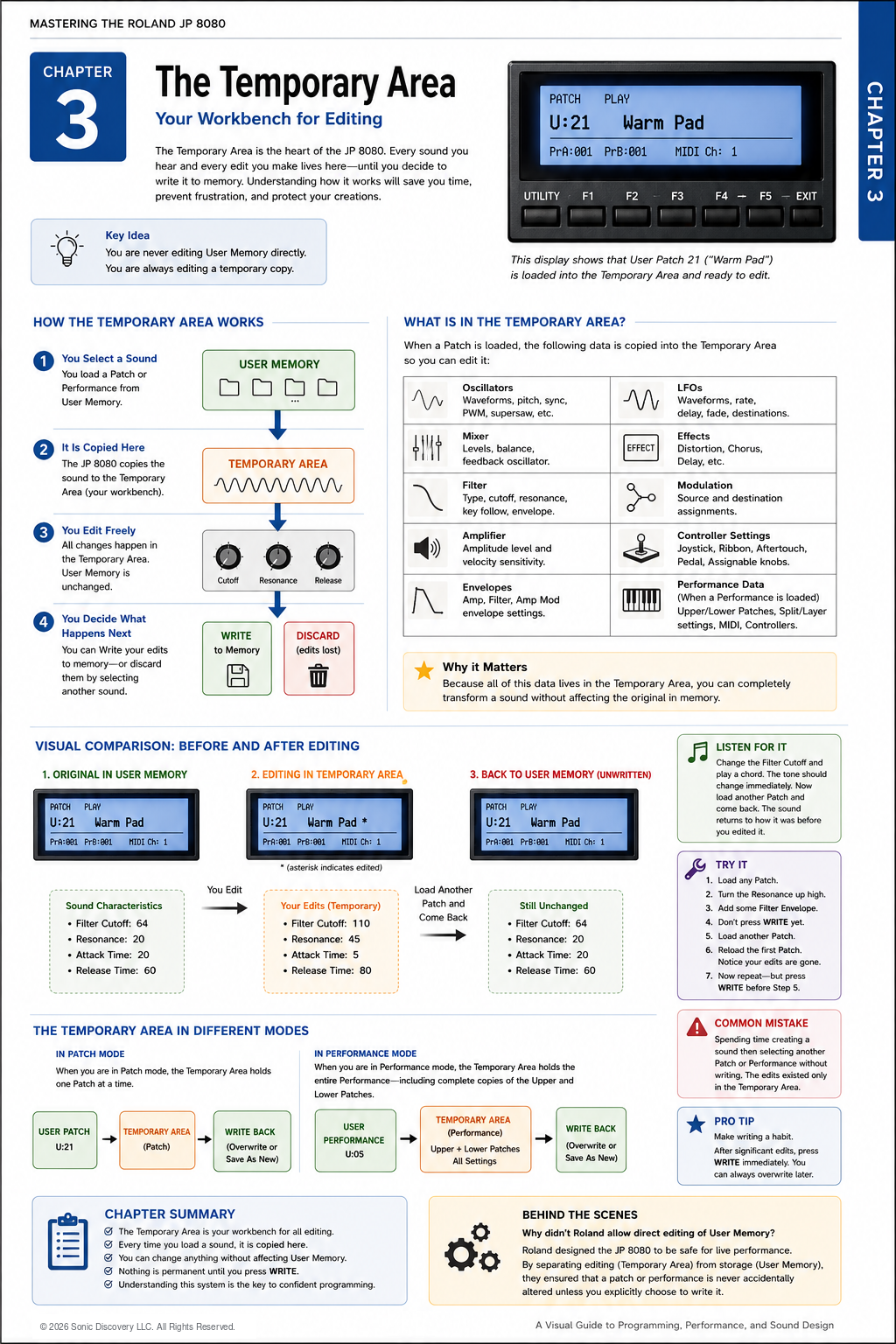
The Temporary Area is the heart of the JP-8080. It is where every sound is loaded before you hear it and where every adjustment you make takes place.
Every great sound you have ever programmed on the JP-8080 started here.
A helpful way to think about the Temporary Area is as a workbench in a workshop. You place an object on the bench, work on it, decide whether you like the result, and then either put it away or discard it. The object stored in the cabinet never changes until you deliberately decide to replace it.
The JP-8080 works the same way. Whenever you load a Patch or a Performance, the synthesizer copies it into the Temporary Area. Every knob movement, button press, and parameter change affects only this temporary copy.
Nothing in permanent memory changes until you press WRITE.
Once you understand this concept, nearly every memory related question on the JP-8080 becomes easier to answer.
How the Temporary Area Works
Imagine loading User Patch U:21 called Warm Pad. The sequence is:
- Load Warm Pad from User Patch Memory.
- The JP-8080 copies the complete Patch into the Temporary Area.
- Make changes to the temporary working copy.
- Press WRITE to save the changes, or select another sound to discard them.
The original Patch remains safely stored in User Memory while you experiment. You can make dramatic changes without worrying about damaging the original.
What Is Stored in the Temporary Area?
The Temporary Area contains everything required to reproduce the sound currently being edited.
When editing a Patch
- Oscillator settings
- Mixer settings
- Filter parameters
- Amplifier settings
- Envelope settings
- LFO settings
- Effects
- Modulation assignments
- Controller assignments
When editing a Performance
- Complete Upper Patch
- Complete Lower Patch
- Keyboard mode
- Split Point
- Layer settings
- MIDI assignments
- Controller assignments
- Performance settings
Everything you hear is coming from the Temporary Area.
Why This Matters
Imagine that every knob on the front panel directly modified permanent memory. One accidental turn of the Cutoff control could permanently alter your favorite sound.
Roland intentionally prevented this. By separating editing from permanent storage, the JP-8080 gives musicians the freedom to experiment without fear. This design helps make it dependable in both the studio and live performance.
Visual Comparison
| Original User Patch | Temporary edits | After loading another Patch |
|---|---|---|
| U:21 Warm Pad | U:21 Warm Pad working copy | U:21 Warm Pad recalled from User Memory |
| Filter Cutoff: 64 | Filter Cutoff: 110 | Filter Cutoff: 64 |
| Resonance: 20 | Resonance: 45 | Resonance: 20 |
| Attack: 25 | Attack: 5 | Attack: 25 |
| Release: 60 | Release: 90 | Release: 60 |
The edited sound may be completely different, but the Patch stored in User Memory still contains the original values. If you select another Patch without pressing WRITE, the Temporary Area is replaced. When you return to Warm Pad, your temporary edits are gone and the original sound is unchanged.
Patch Mode and Performance Mode
| Patch Mode | Performance Mode |
|---|---|
| Holds one complete Patch | Holds a complete Upper Patch, complete Lower Patch, and all Performance settings |
| Every edit affects only the working copy of that Patch | Edits can affect either embedded Patch or the overall Performance configuration |
| WRITE saves the edited sound to a User Patch location | WRITE saves the complete setup to User Performance Memory |
Listen for It
Load a bright Supersaw Patch. Increase the Filter Cutoff, raise Resonance, and lengthen the Release time. Listen to how dramatically the sound changes.
Now select another Patch without pressing WRITE. Return to the original Patch and notice that every change has disappeared. The Temporary Area was replaced by the newly selected sound.
Try It
- Load any User Patch.
- Turn the Cutoff knob almost fully clockwise.
- Increase Resonance.
- Shorten the Attack time.
- Play several notes.
- Without pressing WRITE, select another Patch.
- Reload the original Patch.
Everything has returned to its original state.
Repeat the exercise. This time, press WRITE before selecting another Patch. Reload the Patch and your edits are now permanent.
Common Mistake
Many new owners spend thirty minutes creating a wonderful sound and then immediately browse to another Patch. The sound disappears.
Nothing went wrong. The synthesizer simply replaced the temporary working copy. Always press WRITE when you decide your work is worth saving.
Programming Tip
Experiment first. Write later.
Do not interrupt your creative flow by saving every small adjustment. Spend time exploring different ideas. Once the sound feels complete, press WRITE. This approach encourages creativity while protecting your best work.
Behind the Scenes
Why did Roland separate editing from User Memory?
Imagine performing live with hundreds of carefully programmed sounds. If every knob movement permanently changed memory, one accidental adjustment could ruin an important Patch.
Roland solved this problem by separating editing from storage. Every edit takes place safely in the Temporary Area. Permanent memory changes only when you intentionally press WRITE. This design makes the JP-8080 both forgiving and dependable.
Chapter Summary
- The Temporary Area is your workbench.
- Every sound is copied there before you begin editing.
- You are never editing User Memory directly.
- Permanent memory changes only after pressing WRITE.
- Understanding the Temporary Area is the foundation for mastering the JP-8080.