
JP-8080 guide / Chapter 01
Performance vs. Patch
The complete overview of how Patches, Performances, embedded Patch data, and practical saving workflows fit together.
Chapter 1
This is one of the areas where the JP-8080 differs from many Roland synthesizers, and it can be confusing at first.
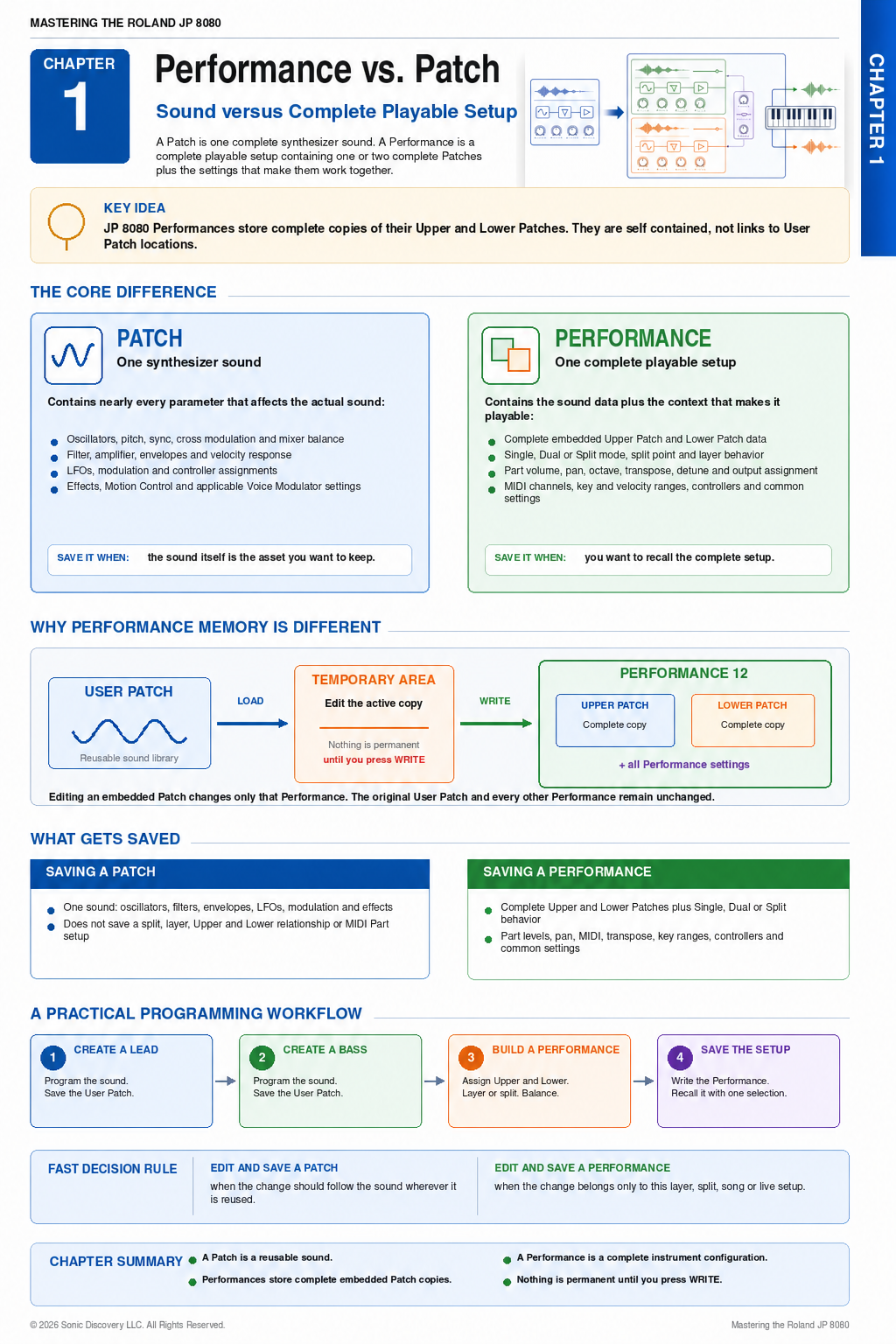
A Patch is a single synthesizer sound.
A Performance is a complete playable setup that contains one or two complete Patches plus all of the performance settings.
The important point is that the JP-8080 embeds complete Patch data inside each Performance rather than merely pointing to separately stored Patches. This is an elegant design and one of the instrument's strengths.
Patch
Think of a Patch as the sound designer's workspace. A Patch contains essentially everything required to create one sound.
Oscillators and mixer
- OSC 1 waveform
- OSC 2 waveform
- Pitch and fine tuning
- Sync and cross modulation
- Mixer balance
Filter and amplifier
- Filter type, cutoff, and resonance
- Key Follow and envelope amount
- Amplifier level and pan
- Velocity response
Envelopes, LFOs, and modulation
- Filter ADSR and Amp ADSR
- LFO waveform, rate, delay, destination, and amount
- Velocity modulation
- Aftertouch assignments
- Mod Wheel assignments
- Assignable control settings
Effects and additional Patch settings
- Chorus and Flanger
- Delay and Distortion
- Effect parameters
- Arpeggiator related Patch settings
- Motion Control assignments
- Voice Modulator settings when applicable
In other words, a Patch contains nearly every parameter that affects the actual sound. When you save a User Patch, you are saving that single synthesizer voice.
Performance
A Performance is much more than simply “Patch A plus Patch B.” It stores a complete Upper Patch, a complete Lower Patch, and the settings that determine how the two Parts work together.
Keyboard and layer settings
- Single mode
- Dual or Layer mode
- Split mode and Split Point
- Layer information
- How the Upper and Lower Parts interact
Independent Part parameters
Each Part can have its own:
- MIDI channel
- Volume and pan
- Octave shift and transpose
- Detune
- Output assignment
- Key range and velocity range
Common Performance parameters
- Master balance
- Common controller assignments
- Performance level settings
- Everything required to recreate the complete playable setup
The Biggest Difference
Many synthesizers use Performances that simply refer to separate Patch locations. With that type of system, editing a Patch can change every Performance that uses it.
The JP-8080 works differently. Each Performance contains complete copies of its Upper and Lower Patches, together with its Performance settings. Everything is self contained.
This means you can edit a Patch inside Performance 12 and save Performance 12 without changing any other Performance. The original User Patch also remains unchanged unless you explicitly overwrite it.
Why Edit a Patch?
Edit a Patch when your goal is to create or improve the sound itself. For example:
- I want a better Supersaw.
- I want more filter bite.
- I want a slower attack.
- I want deeper PWM.
The result is one reusable sound that can become part of many different Performances.
Why Edit a Performance?
Edit a Performance when your goal is to build a complete playable instrument.
Layer example
- Upper: Supersaw Strings
- Lower: Sub Bass
Split example
- Left hand: Bass
- Right hand: Lead
Detuned layer example
- Upper: Bright Saw, panned left
- Lower: The same Saw, detuned by 7 cents and panned right
Live Performance example
A Performance can recall Upper and Lower volume, keyboard Split, MIDI channels, transpose settings, and controller assignments with one selection.
What Gets Saved?
| Saving a Patch | Saving a Performance |
|---|---|
| One sound, including oscillators, filters, envelopes, effects, LFOs, and modulation | Complete Upper and Lower Patches, plus the Performance settings that make them work together |
| Does not save the Split, Layer, Upper and Lower relationship, or MIDI Part setup | Saves Layer, Split, keyboard mode, volumes, pan, MIDI settings, transpose, Part settings, and common Performance parameters |
| A reusable synthesizer voice | An entire instrument configuration |
Practical Workflow
- Create a lead Patch. Program the sound and save it as a User Patch.
- Create a bass Patch. Program the sound and save it as a User Patch.
- Create a Performance. Assign the lead to the Upper Part and the bass to the Lower Part. Layer or Split them, adjust the balance, and save the Performance.
- Refine the setup. If the lead needs more resonance, edit the embedded lead inside that Performance and save the Performance again.
The original User Patch remains unchanged unless you explicitly overwrite it. Other Performances are also unaffected because each one stores its own embedded copies of the Upper and Lower Patches.
Recommended Organization
Treat Patches as your building blocks or sound library. Treat Performances as the finished instruments you actually use in songs or live sets.
This approach makes the JP-8080 easier to organize. You can maintain a clean library of reusable sounds while creating multiple Performances that use variations of those sounds without causing unintended changes elsewhere.
Seeing the Memory Architecture
A diagram showing the Temporary Area, User Patch memory, and User Performance memory can make this architecture immediately intuitive. Roland's implementation is more sophisticated than that of many virtual analog synthesizers of its era, but the data flow becomes logical once you see where each complete copy is loaded, edited, and saved.
Chapter Summary
- A Patch is one reusable synthesizer sound.
- A Performance is a complete playable instrument configuration.
- Performances store complete embedded copies of their Upper and Lower Patches.
- Editing an embedded Patch affects only that Performance unless you overwrite a User Patch.
- Edit and save a Patch when the sound should be reusable.
- Edit and save a Performance when the change belongs to a specific Layer, Split, song, or live setup.