
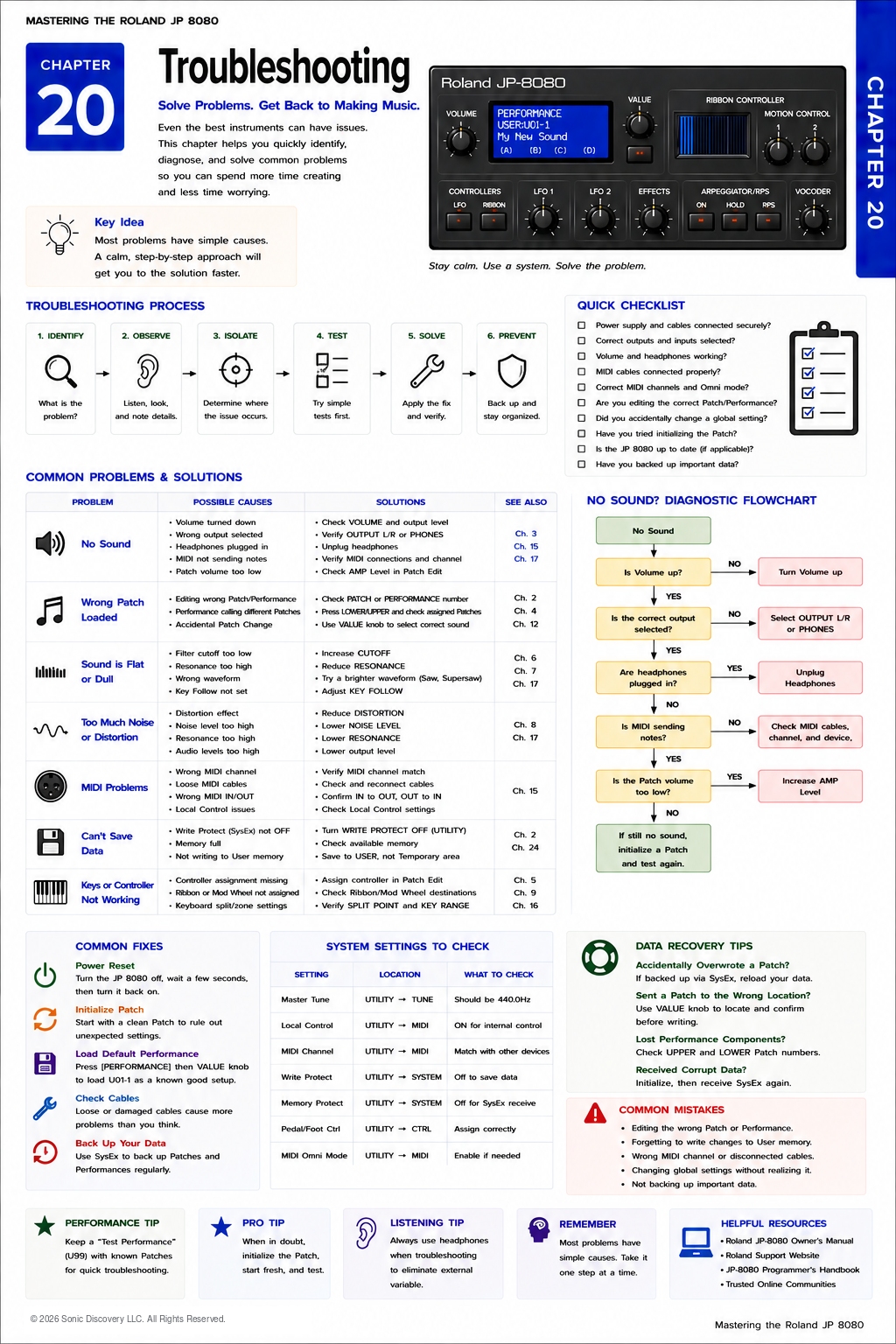
JP-8080 guide / Chapter 20
Troubleshooting
A practical diagnostic process for sound, Patch, MIDI, saving, noise, and controller problems.
Chapter 20
Every unexpected behavior has a cause. The key is learning how to find it logically.
Even the most experienced synthesizer programmers occasionally encounter unexpected behavior. A sound may seem to disappear, a controller may stop responding, or a Performance may not sound the way it did yesterday.
In most cases, the JP-8080 is functioning exactly as designed. The challenge is identifying which setting is responsible.
One of the biggest mistakes new users make is changing many parameters at once while trying to solve a problem. Unfortunately, this usually makes the situation more confusing.
Professional technicians take a different approach. They change one thing at a time. By following a logical troubleshooting process, you can quickly isolate the cause of almost any problem.
A Logical Troubleshooting Process
Every troubleshooting process follows the same basic sequence:
- Observe the problem.
- Identify possible causes.
- Test one setting.
- Confirm the result.
- Move to the next test if needed.
Changing only one variable at a time makes the solution much easier to identify.
Common Problems and Solutions
Problem One: No Sound
This is one of the most common concerns. Fortunately, it is usually caused by a simple setting.
Check the following:
- Is the Master Volume turned up?
- Are headphones or speakers connected correctly?
- Are the audio cables connected to the proper outputs?
- Is the amplifier or mixer turned on?
- Is Local Control disabled?
- Is the keyboard transmitting on the correct MIDI channel?
- Is the selected Performance using a Patch with the Amplifier Level turned down?
- Is the Filter Cutoff completely closed?
Begin with the simplest possibilities before assuming a hardware fault.
Problem Two: A Patch Sounds Different Than Expected
A Patch may sound different because it is being used inside a Performance. A Performance contains additional settings such as:
- Layer balance
- Split point
- Controller assignments
- Effects routing
- Performance level
If the standalone Patch sounds correct but the Performance does not, compare the Performance settings rather than the Patch itself.
Problem Three: I Changed a Patch but the Performance Did Not Change
This question often confuses new users. Remember the JP-8080 memory architecture.
When editing a Patch inside a Performance, you are working with the copy loaded into the Temporary Area. Unless you intentionally write the edited Patch to User Patch memory and then update the Performance if needed, the original stored Patch remains unchanged.
Likewise, editing a standalone User Patch does not automatically update Performances that contain previously stored copies of that Patch.
Understanding this relationship prevents many accidental programming mistakes.
Problem Four: The Arpeggiator Is Not Running
Check these items:
- Is the Arpeggiator enabled?
- Is Hold activated when appropriate?
- Is MIDI Clock set to an external source without receiving clock information?
- Is the correct tempo selected?
- Are notes actually being played?
If the JP-8080 is waiting for an external MIDI Clock, the Arpeggiator will remain stopped until timing information arrives.
Problem Five: Motion Control Does Not Play Back
Verify the following:
- Was Motion Control actually recorded?
- Is Motion playback enabled?
- Was the edited Performance saved?
- Is the correct Patch or Performance loaded?
Many Motion Control problems result from forgetting to save the completed programming.
Problem Six: Ribbon Controller Does Nothing
The Ribbon Controller must first be assigned to a destination.
- Is a destination assigned?
- Is the modulation depth set above zero?
- Is the current Patch using Ribbon assignments?
- Is the Ribbon functioning only within a specific operating range?
Without an assignment, touching the Ribbon produces no audible change.
Problem Seven: MIDI Is Not Working
Begin with the basics. Check:
- MIDI cable direction
- MIDI channel
- Local Control
- MIDI interface
- Computer settings
- DAW track assignment
- MIDI filters
- USB or MIDI interface drivers
Remember that MIDI OUT connects to MIDI IN. Many connection problems result from accidentally connecting OUT to OUT.
Problem Eight: Notes Continue Playing
This is commonly called a stuck note. Possible causes include:
- A Sustain pedal remaining active
- Hanging MIDI messages
- A faulty MIDI cable
- An external sequencer continuing to transmit Note On messages
- Missing Note Off messages
Stopping the sequencer or resetting MIDI communication usually resolves the issue.
Problem Nine: Distorted Sound
Distortion is not always caused by the JP-8080. Check:
- Mixer input gain
- Audio interface input level
- Powered speaker volume
- Internal Distortion Effect
- Patch output level
- External processing
Avoid clipping at every stage of the signal path.
Problem Ten: Effects Seem to Be Missing
Ask yourself:
- Is the Effect enabled?
- Has the Effect level been reduced?
- Are you listening through both outputs?
- Is the current Performance using different Effect settings?
Sometimes a Patch sounds dry because it is being auditioned outside the Performance where its Effects were originally configured.
Common Problems at a Glance
| Problem | First checks | Important clue |
|---|---|---|
| No Sound | Volume, outputs, Local Control, MIDI channel, Amplifier Level, Filter Cutoff | Test the simplest connection or level first. |
| Patch Sounds Different | Performance level, Layer, Split, controllers, Effects | The Performance may be changing how the Patch is heard. |
| Patch Change Is Missing | Temporary Area, User Patch write, Performance write | A Performance contains its own stored Patch copies. |
| Arpeggiator Stopped | Arpeggiator On, Hold, tempo, MIDI Clock | External Clock mode requires incoming timing. |
| Motion Control Stopped | Recording, playback setting, saved Performance, correct sound | An unsaved Motion recording can be lost. |
| Ribbon Has No Effect | Destination, depth, assignment, operating range | The Ribbon needs an active assignment. |
| MIDI Failure | Cable direction, channel, Local Control, interface, DAW | MIDI OUT must connect to MIDI IN. |
| Stuck Notes | Sustain pedal, MIDI cable, sequencer, Note Off messages | Resetting MIDI communication often clears the note. |
| Distorted Sound | Input gain, output level, Distortion Effect, external processing | Clipping can happen anywhere in the signal path. |
| Missing Effects | Effect On, Effect level, stereo outputs, Performance settings | The original Effect may belong to a Performance. |
Memory Related Problems
If a Patch or Performance appears to have disappeared, ask:
- Was it actually saved?
- Was another location overwritten?
- Was the edit only in Temporary memory?
- Was Factory Reset performed?
The Temporary Area is erased whenever another Patch or Performance is loaded. Always save important work before selecting another sound.
Backup Problems
If a SysEx backup cannot be restored, check:
- MIDI channel
- SysEx reception enabled
- MIDI interface compatibility
- Transmission speed
- Correct backup file
Some older MIDI interfaces filter or interrupt long SysEx messages. Using a reliable interface greatly improves backup success.
Troubleshooting Workflow
Whenever something unexpected happens, ask these questions in order:
- What exactly is wrong?
- When did it begin?
- What changed immediately before the problem appeared?
- Can the problem be reproduced consistently?
- Does it occur with every Patch?
- Does it occur with every Performance?
- Is the issue related to hardware or programming?
This structured approach often reveals the answer before extensive testing is required.
Listen for It
- Create a simple Patch.
- Lower the Filter Cutoff until the sound becomes extremely dark and listen carefully.
- Restore the Filter, then reduce the Amplifier Sustain and observe the change.
- Continue introducing only one programming change at a time.
By introducing one modification at a time, you begin recognizing how individual parameters affect the overall sound. This same listening skill is invaluable when troubleshooting unexpected behavior.
Try It
- Initialize a Patch and save it.
- Lower the Filter Cutoff completely.
- Save the edited Patch to a different location.
- Compare the two versions.
- Restore the brighter version.
- Repeat using Envelope Attack.
- Repeat using LFO Depth.
This exercise develops confidence by showing how a single parameter can dramatically alter a sound while leaving the rest of the Patch unchanged.
Common Mistake
Changing several settings at once while trying to solve a problem makes it almost impossible to know which adjustment actually solved the issue.
For example, increasing the Filter, adjusting the LFO, changing the Effect, modifying the Envelope, and changing the Oscillator at the same time hides the real cause.
Professional programmers isolate one variable at a time.
Pro Tip
Keep a simple troubleshooting log. Whenever you solve an unfamiliar problem, write down:
- The symptoms
- The cause
- The solution
After a few months, you will have a valuable personal reference that often answers future questions in seconds.
Behind the Scenes
Why does the JP-8080 sometimes appear to behave unexpectedly?
Most unexpected behavior is not caused by hardware faults. Instead, it results from the instrument’s powerful programming architecture.
Because the JP-8080 stores Temporary edits, User Patches, User Performances, controller assignments, Motion Control recordings, MIDI settings, and Effects independently, multiple settings can interact at the same time.
Once you understand how these systems relate to one another, troubleshooting becomes much more logical. Instead of assuming the synthesizer is malfunctioning, you begin asking which part of the programming architecture is responsible for the behavior you are hearing.
That shift in thinking is one of the most important milestones in mastering the instrument.
Preventive Maintenance
Many problems can be avoided before they occur. Develop these habits:
- Save your work frequently.
- Create regular SysEx backups.
- Label backup files clearly.
- Keep audio and MIDI cables organized.
- Clean connectors periodically.
- Test live Performances before rehearsals.
- Verify MIDI communication before recording sessions.
- Store the instrument in a clean, dry environment.
- Use a quality surge protector.
Good maintenance is the best form of troubleshooting.
Chapter Summary
- Troubleshoot systematically rather than randomly.
- Change only one parameter at a time.
- Understand the difference between Temporary memory, User Patch memory, and User Performance memory.
- Verify simple causes before assuming a hardware problem.
- Most MIDI issues involve connections, channels, or Local Control.
- Save your work before changing Patches or Performances.
- Keep reliable SysEx backups of important sounds.
- Good organization prevents many common problems.
- Careful observation is more effective than trial and error.