
JP-8080 guide / Chapter 21
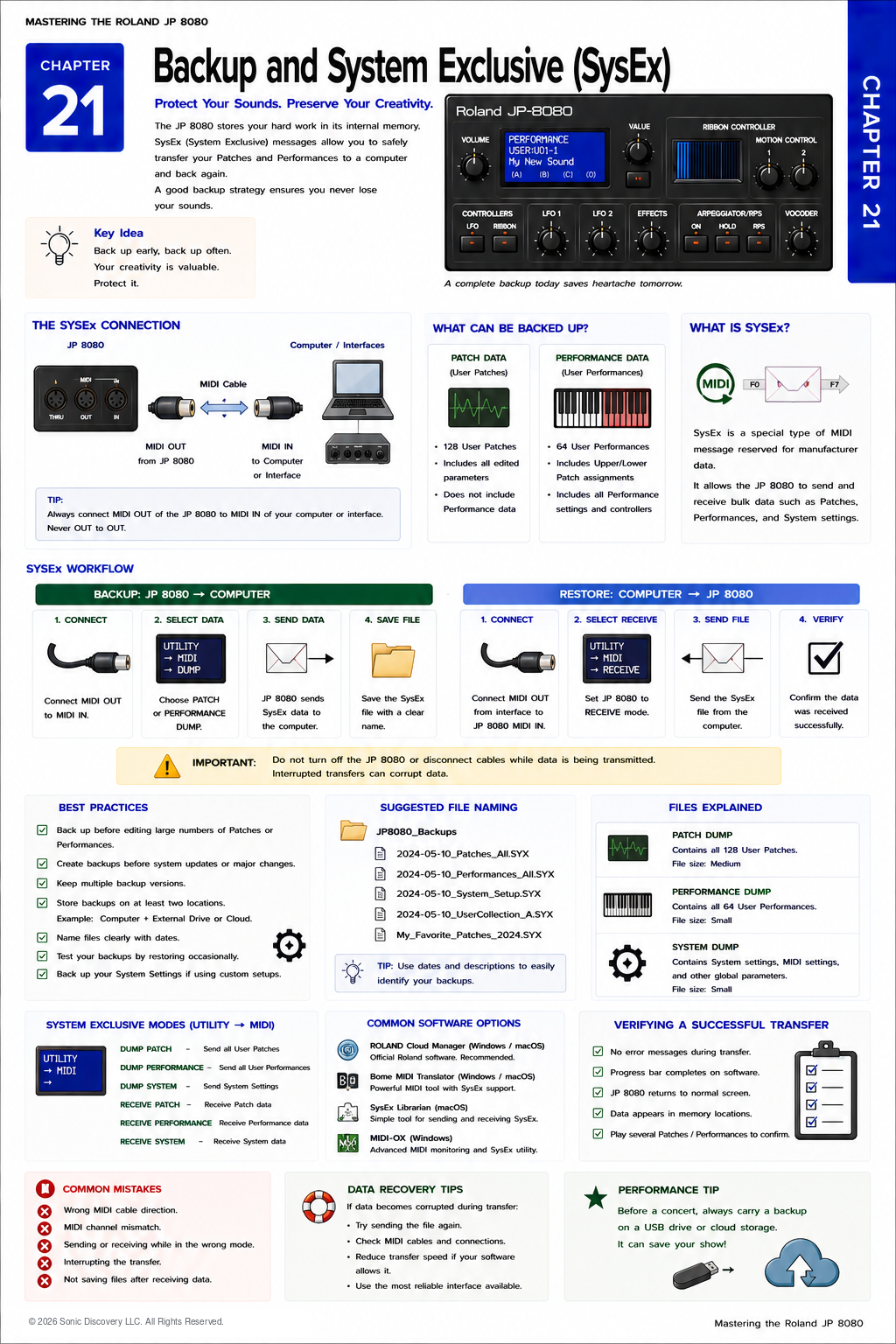
Backup and System Exclusive
SysEx connections, backup and restore workflows, file naming, software, and transfer verification.
Chapter 21
The best time to make a backup is before you need one.
After spending hours, days, or even years creating original sounds, nothing is more disappointing than losing them because of accidental overwriting, memory corruption, or equipment failure.
Fortunately, the Roland JP-8080 provides a reliable way to preserve your work through System Exclusive, commonly called SysEx.
SysEx allows the synthesizer to send and receive detailed information about its memory. Unlike ordinary MIDI messages, which transmit performance information such as notes and controller movements, SysEx transfers the actual programming data that defines your sounds.
Understanding how SysEx works is one of the most valuable skills you can learn as a JP-8080 owner. Once you establish a consistent backup routine, you can experiment freely, knowing your original work is always protected.
What Is System Exclusive?
System Exclusive is a special type of MIDI message designed to transfer information that is unique to a particular manufacturer or instrument.
Unlike Note On or Pitch Bend messages, SysEx contains detailed programming information. For the JP-8080, SysEx can transfer:
- Individual User Patches
- Individual User Performances
- Complete User Patch memory
- Complete User Performance memory
- System settings
This information can be stored on a computer and restored later if necessary.
MIDI Versus SysEx
Many users assume SysEx is simply another name for MIDI. It is not. SysEx is a specialized category within the MIDI standard.
| Standard MIDI | System Exclusive |
|---|---|
| Notes | Patch data |
| Velocity | Performance data |
| Pitch Bend | System settings |
| Modulation | Complete memory backups |
| Program Change | Manufacturer specific information |
Think of ordinary MIDI as a live musical performance. Think of SysEx as a complete blueprint of the synthesizer’s programming.
Why Backups Matter
Imagine spending several months creating original Leads, Performance setups, Motion Control recordings, and layered Performances. Now imagine accidentally overwriting one memory location.
Without a backup, that work may be impossible to recover. With SysEx, restoration often takes only a few minutes.
What Should You Back Up?
Ideally, everything.
| Category | What it contains |
|---|---|
| User Patch Memory | All of your stored User Patches |
| User Performance Memory | All stored Performances, including Upper and Lower Patch assignments, Split settings, controller assignments, Performance levels, and additional Performance parameters |
| System Settings | MIDI configuration, Utility settings, and other instrument wide preferences |
Although System settings change less frequently, they should still be backed up periodically.
When Should You Create Backups?
Develop a regular routine. Create backups:
- Before major programming sessions
- Before editing factory inspired sounds
- Before live performances
- Before installing new studio equipment
- Before restoring memory
- After completing important projects
- After creating several new Patches
Waiting until something goes wrong is already too late.
Basic Backup Workflow
- Connect the JP-8080 MIDI OUT to the MIDI IN on your computer interface.
- Open your SysEx software and prepare it to receive data.
- Start the appropriate dump from the JP-8080.
- Allow the transfer to finish without disconnecting anything.
- Save the received data as a clearly named SysEx file.
The software stores the transmitted SysEx data as a file that can be restored later.
Basic Restore Workflow
- Connect the MIDI OUT of the computer interface to the JP-8080 MIDI IN.
- Prepare the JP-8080 to receive the appropriate SysEx data.
- Open the saved SysEx file in your software.
- Transmit the file to the JP-8080.
- Wait for the transfer to complete and verify the restored memory.
The synthesizer rebuilds its memory using the information contained in the backup file.
Naming Your Backup Files
A good naming system prevents confusion later. Descriptive examples include:
JP8080_UserPatches_2026_07_25.syxJP8080_Performances_LiveSet.syxJP8080_Backup_BeforeAlbumProject.syxJP8080_StudioConfiguration.syx
Avoid vague names such as Backup1, Final, New, or Test. Descriptive names save time months or years later.
Organizing Your Backups
Create a dedicated JP8080 Backups folder with clearly labeled sections:
- User Patches
- Performances
- Live Shows
- Studio Projects
- Factory Archive
- System Settings
Organization becomes increasingly valuable as your sound library grows.
Verifying the Backup
Creating a backup is only the first step. Verify that it actually worked.
- Did the software report successful transmission?
- Was the backup file created?
- Does the file size appear reasonable?
- Can the file be opened by your SysEx software?
Professional studios routinely verify backups rather than assuming they are correct.
Keep Multiple Copies
Follow a simple rule. If your backup exists in only one place, it is not fully protected.
Keep copies on your computer, on an external drive, and in cloud storage if desired. Multiple copies protect against hardware failure.
Back Up Before Major Editing
Suppose you want to redesign twenty factory inspired Patches. Before beginning:
- Create a complete SysEx backup.
- Save the backup.
- Verify it.
- Begin programming.
Now you can experiment without fear of permanent loss.
Understanding SysEx Dumps
A dump simply means transmitting data from one device to another.
| Dump type | Purpose | Useful when |
|---|---|---|
| Patch Dump | Transfers one User Patch | Sharing or archiving a single sound |
| Performance Dump | Transfers one User Performance | Exchanging a complete live setup |
| Bulk Dump | Transfers many memory locations at once | Archiving the entire synthesizer |
| System Dump | Transfers global settings | Moving between multiple studio environments |
Sharing Sounds
One advantage of SysEx is that it allows musicians to exchange original programming.
For example, a friend creates an exceptional Lead sound and exports it as a SysEx Patch. You receive the file and load it into your JP-8080. The synthesizer recreates the Patch exactly as programmed.
This capability has contributed to the preservation of many classic synthesizer sound libraries.
Listen for It
- Create a new User Patch and give it a unique name.
- Save it.
- Create a SysEx backup of that Patch.
- Rename the Patch inside the synthesizer.
- Restore the SysEx backup.
- Notice that the original programming returns exactly as it existed when the backup was created.
This simple exercise demonstrates how accurately SysEx preserves programming information.
Try It
- Connect the JP-8080 to your computer through a MIDI interface.
- Open SysEx software.
- Create a complete User Patch backup and save the file using today’s date.
- Create a User Performance backup.
- Save the System settings.
- Copy the files to a second storage location.
Repeat this process regularly until it becomes part of your normal workflow.
Common Mistake
Many users spend years programming sounds without ever creating a backup. Then, after accidentally overwriting memory or replacing a battery or hardware component, they discover their work is gone.
A five minute backup session can preserve hundreds of hours of programming. Make backups part of your creative routine.
Pro Tip
Create milestone backups:
- Before beginning a new album
- Before a concert tour
- Before experimenting with new programming ideas
- After completing a large sound design project
Milestone backups allow you to return to important stages of your work at any time.
Behind the Scenes
Why did Roland include SysEx?
When the JP-8080 was developed, professional musicians expected to preserve their custom sounds for years of studio and stage use.
Roland implemented comprehensive System Exclusive support so users could archive every important aspect of the instrument’s memory. Rather than relying solely on internal storage, programmers could safely move their work between computers, backup media, and other compatible systems.
Although modern technologies have changed how files are stored, SysEx remains one of the most dependable methods of preserving synthesizer programming because it records the actual parameter data that defines each sound.
Recommended Backup Strategy
| Copy | Location | Purpose |
|---|---|---|
| Working Copy | Inside the JP-8080 | The current version used for programming and performance |
| Local Backup | Your computer | A convenient restoration copy |
| Archive Copy | External drive or cloud storage | Protection against accidental deletion, hardware failure, and file corruption |
Creative Exercise
Build Your Personal Sound Library
Create folders for Basses, Leads, Pads, Strings, Effects, Vocoder, Live Performances, and Experimental Sounds.
Whenever you finish programming a sound you truly enjoy, export it as an individual SysEx file in addition to your regular full backups.
Over time, you will build a searchable library of your best work that is independent of the synthesizer’s internal memory.
Chapter Summary
- SysEx stores programming data rather than audio.
- Regular backups protect your creative work.
- Back up User Patches, User Performances, and System settings.
- Verify every backup after creating it.
- Keep multiple copies in different locations.
- Use descriptive file names and organized folders.
- Create milestone backups before major programming sessions.
- Individual Patch dumps and complete Bulk Dumps each serve different purposes.
- A reliable backup strategy encourages creative experimentation because your original work is always protected.