
JP-8080 guide / Chapter 04
Patch Structure
The signal path and the sound shaping building blocks inside every Patch.
Chapter 4
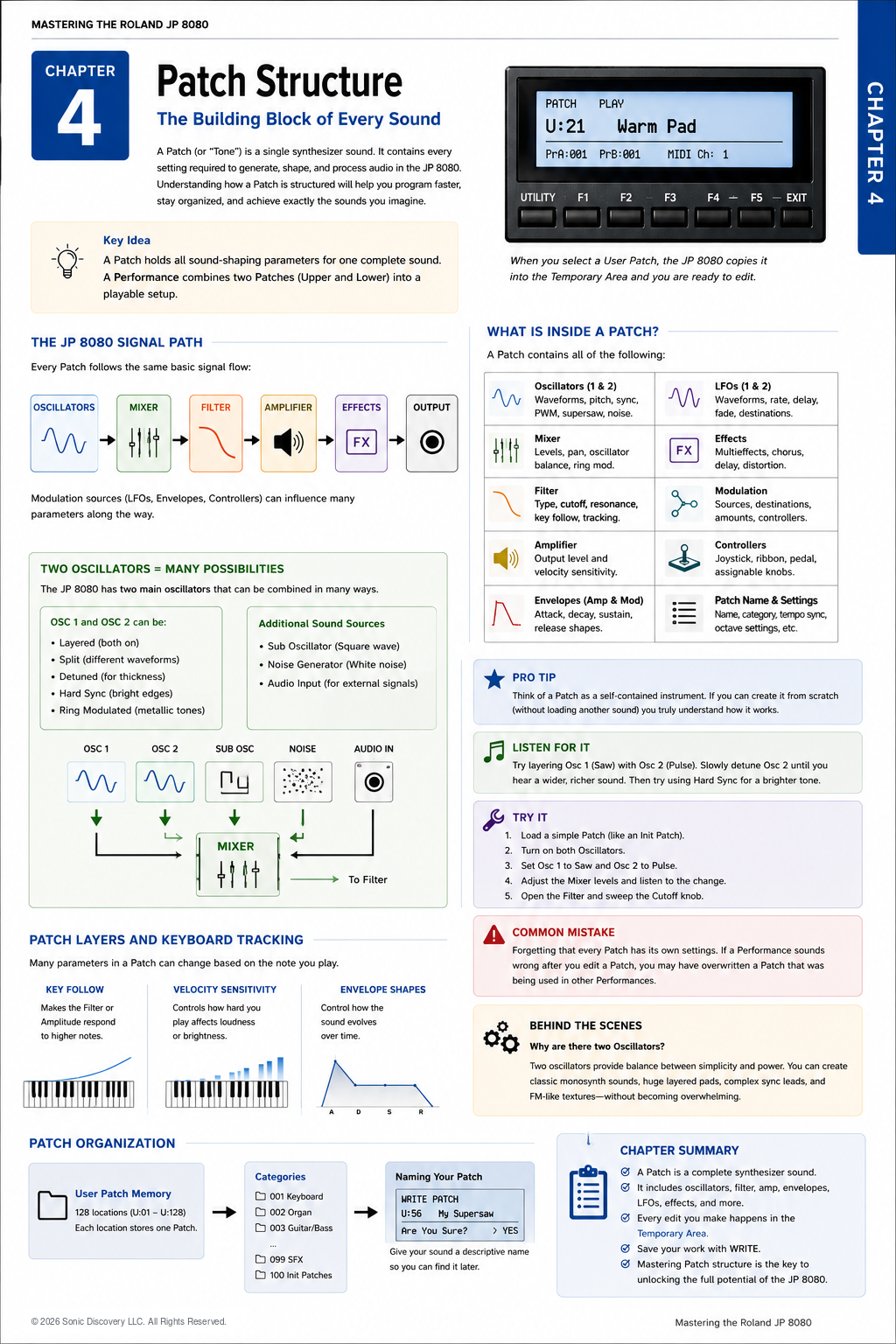
A Patch is the foundation of the JP-8080. Whether you are creating a warm analog pad, a powerful trance lead, a deep bass, or an evolving ambient texture, every sound begins with a Patch.
Every sound you hear from the JP-8080 begins as a Patch.
Think of a Patch as a complete musical instrument. It contains everything needed to generate, shape, and process a sound. When you edit a Patch, you are designing the instrument itself.
Once you understand how a Patch is organized, programming the JP-8080 becomes much more intuitive.
A Performance does not create sound on its own. Instead, it combines one or two complete Patches into a playable keyboard setup.
What Makes Up a Patch?
A Patch is built from several sections that work together in sequence. Each section performs a specific job.
- Oscillators generate the raw sound.
- Mixer balances the sound sources.
- Filter shapes the harmonic content.
- Amplifier controls the output level.
- Effects polish and enhance the sound.
- Outputs send the completed sound onward.
As the signal moves through each stage, it is gradually transformed into the final sound you hear. Understanding this flow is one of the most important skills in sound design.
The Oscillators
The oscillators are the starting point of every Patch. Think of them as the raw material. Without an oscillator, there is no sound to shape.
The JP-8080 provides two main oscillators, allowing you to combine different waveforms and synthesis techniques. You can:
- Layer identical waveforms for a fuller sound.
- Mix different waveforms for added complexity.
- Detune the oscillators for width and movement.
- Use Hard Sync for bright, cutting tones.
- Use Ring Modulation for metallic textures.
The oscillators are where the personality of the Patch begins.
Additional Sound Sources
Sub Oscillator
The Sub Oscillator adds low frequency energy below the main sound. It is commonly used to give bass sounds more weight and authority.
Noise Generator
The Noise Generator produces white noise. Noise is often mixed into Patches to create breath, air, percussion, wind, or attack transients. Even a small amount can make a sound feel more natural.
Audio Input
The Audio Input allows external audio to be processed through the JP-8080's filters and effects. This opens creative possibilities for processing vocals, drum machines, and other synthesizers.
The Mixer
After the sound is created, it enters the Mixer. The Mixer determines how much of each sound source reaches the Filter. Think of it as the balance control for your instrument.
A typical Patch may contain Oscillator 1, Oscillator 2, the Sub Oscillator, and Noise. By adjusting their levels, you create the overall tonal balance before filtering begins.
The Filter
The Filter shapes the harmonic content of the sound. This is often where a Patch gains its emotional character.
- Opening the Filter produces a brighter sound.
- Closing the Filter creates a warmer, softer tone.
- Increasing Resonance emphasizes frequencies near the Cutoff point, adding character and movement.
Many musicians consider the Filter to be the expressive heart of an analog style synthesizer.
The Amplifier
The Amplifier controls the final output level of the Patch. It determines how the sound begins, sustains, and fades away.
Although the Amplifier affects loudness, it also plays a major role in shaping the musical feel of a sound through its Envelope.
Envelopes
Envelopes describe how a sound changes over time. The JP-8080 uses ADSR envelopes:
- Attack
- Decay
- Sustain
- Release
These four stages define how the sound evolves from the moment a key is pressed until it completely fades away. Changing only the Envelope can transform the same Patch from a short percussive sound into a slow atmospheric pad.
Low Frequency Oscillators
LFOs introduce movement. Rather than creating audible sound, they continuously change other parameters.
Common modulation destinations include:
- Pitch
- Filter Cutoff
- Amplifier Level
- Pulse Width
LFOs bring life and motion to an otherwise static sound.
Modulation
One of the strengths of the JP-8080 is its flexible modulation system. Modulation allows one control or source to influence another parameter.
| Source | Destination | Musical result |
|---|---|---|
| Envelope | Filter Cutoff | Tone changes over the life of the note |
| LFO | Pitch | Vibrato or pitch movement |
| Velocity | Amplifier Level | Playing dynamics control loudness |
| Ribbon Controller | Filter Cutoff | Expressive manual Filter sweeps |
| Mod Wheel | Vibrato | Performance controlled pitch expression |
Good modulation gives a Patch expression and musicality.
Effects
Effects are the final stage of the Patch. They polish and enhance the sound after synthesis is complete.
Common effects include Chorus, Delay, and Distortion. Effects should enhance a well designed Patch, not rescue a weak one. A strong Patch usually sounds good even with all effects bypassed.
Listen for It
- Load any factory Supersaw Patch.
- Mute Oscillator 2 and play several notes.
- Slowly raise Oscillator 2 in the Mixer and notice how the sound becomes larger and more complex.
- Add a small amount of Detune and listen as the stereo image widens.
- Increase the Chorus effect and observe how each stage contributes something different to the final sound.
Try It
Create a simple Patch using only one Saw waveform. Play several notes, then make one change at a time:
- Add Oscillator 2.
- Increase Detune.
- Lower the Filter Cutoff.
- Raise Resonance.
- Increase Release.
- Add Chorus.
After each adjustment, stop and listen carefully. Learning to identify the contribution of each section is one of the fastest ways to improve your programming skills.
Common Mistake
Many beginners immediately begin turning every knob. The result is often a Patch that sounds confusing or muddy.
Instead, work methodically. Adjust one section, listen, understand the change, and then continue. Small, deliberate adjustments almost always produce better results than making many changes at once.
Programming Tip
Whenever you create a new Patch, start with the simplest possible sound: one oscillator, no effects, and no modulation.
Once the core sound is working, add complexity one layer at a time. This approach makes it much easier to understand exactly what each parameter contributes.
Behind the Scenes
Why two oscillators?
Roland chose a two oscillator architecture because it offers an excellent balance between flexibility and simplicity.
With two oscillators you can create:
- Thick layered sounds
- Wide detuned leads
- Rich evolving pads
- Bright Hard Sync tones
- Metallic Ring Modulation textures
At the same time, the interface remains easy to understand. This design philosophy is one reason the JP-8080 became popular among both beginners and experienced synthesizer programmers.
Chapter Summary
- A Patch is one complete synthesizer sound.
- Every Patch follows the same basic signal path.
- The oscillators generate the sound.
- The Mixer blends the sound sources.
- The Filter shapes the tone.
- The Amplifier controls loudness over time.
- LFOs and Envelopes create movement.
- Effects polish the finished sound.
- Mastering Patch Structure is the first step toward mastering the JP-8080.