
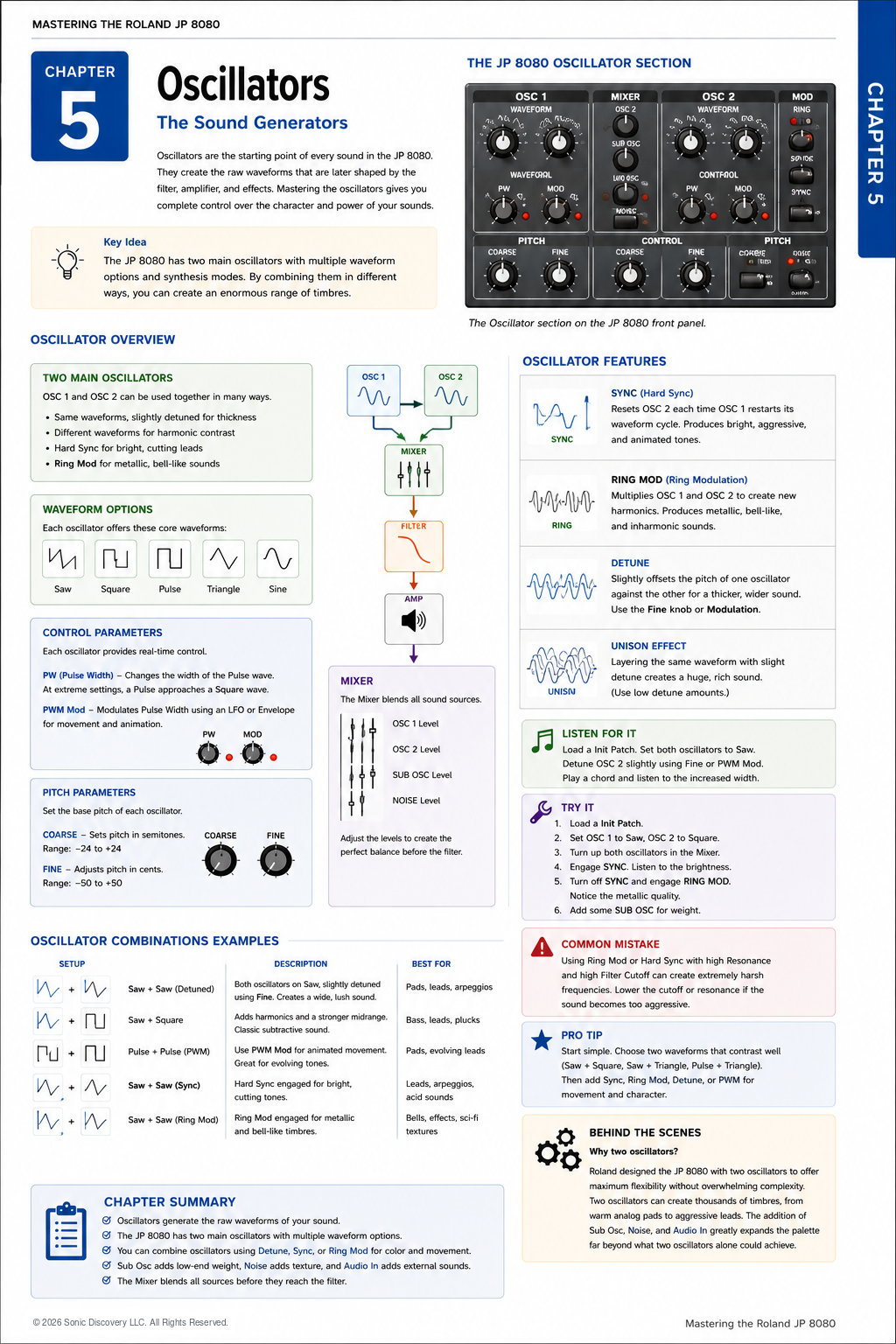
JP-8080 guide / Chapter 05
Oscillators
Waveforms, sync, ring modulation, detune, pitch controls, and oscillator combinations.
Chapter 5
If the Filter is often called the heart of a synthesizer, then the Oscillator is unquestionably its voice.
Every sound begins with a vibration. The oscillator creates that vibration.
The Oscillators generate the raw waveforms that become every sound produced by the JP-8080. Before a sound can be filtered, shaped, or enhanced with effects, it must first be created. That is the role of the Oscillator.
The JP-8080 gives you two primary oscillators, each capable of producing a wide variety of waveforms and synthesis techniques. By combining them in different ways, you can create sounds ranging from warm analog pads to aggressive trance leads and experimental textures.
Understanding the Oscillators is one of the most important steps toward mastering sound design.
When programming a new Patch, begin by creating a strong oscillator combination before moving on to Filters, Envelopes, or Effects.
Meet OSC 1 and OSC 2
The JP-8080 provides two fully featured oscillators. Each oscillator can operate independently, allowing them to work together in many creative ways.
- Play identical waveforms for a thicker sound.
- Combine different waveforms for richer harmonics.
- Detune one oscillator against the other for width.
- Synchronize them using Hard Sync.
- Combine them using Ring Modulation.
- Blend them in different proportions using the Mixer.
Think of the two oscillators as two musicians playing together. They can perform the same part in perfect unison, or each can contribute something unique to create a richer performance.
Waveforms
A waveform is the basic shape of the sound generated by an oscillator. Each waveform has its own character.
| Waveform | Character | Common uses |
|---|---|---|
| Saw | Bright and harmonically rich. Responds exceptionally well to filtering. | Pads, strings, brass, trance leads, and Supersaw sounds |
| Square | Hollow and woody. Becomes more expressive with Pulse Width Modulation. | Vintage synthesizer sounds, clarinet like tones, electronic basses, and chiptune style sounds |
| Pulse | Similar to a Square wave, but with adjustable width and changing harmonic content. | PWM sounds, animated pads, and expressive analog textures |
| Triangle | Smooth, soft, and rounded because it contains fewer harmonics. | Soft basses, flutes, subtle pads, and layering beneath brighter sounds |
| Sine | The purest waveform, containing one frequency without additional harmonics. | Sub bass, bell synthesis, FM style sounds, and layering |
Pitch Controls
Each oscillator has independent pitch controls. These determine how the oscillators relate to one another.
Coarse Tune
Coarse Tune changes pitch in semitone steps. Typical uses include placing one oscillator an octave lower, creating fifth intervals, and building layered chords.
Fine Tune
Fine Tune adjusts pitch in very small increments. Its primary purpose is to create subtle detuning. Small pitch differences produce a wider, richer sound, while larger differences create more dramatic musical intervals.
Pulse Width
When using Pulse waves, Pulse Width determines how much of each waveform cycle remains high compared with low. Changing the Pulse Width alters the harmonic content without changing the pitch.
As the width becomes narrower, the tone becomes thinner and brighter.
Pulse Width Modulation
Pulse Width Modulation, or PWM, automatically changes the Pulse Width over time. This movement creates one of the classic sounds associated with vintage analog synthesizers.
Instead of remaining static, the waveform continuously evolves. Slow PWM is excellent for lush pads. Faster PWM can create energetic, animated leads.
Hard Sync
Hard Sync is one of the signature features of many classic synthesizers. When enabled, OSC 2 is forced to restart its waveform every time OSC 1 begins a new cycle.
This creates additional harmonics that produce bright, aggressive tones. Hard Sync is ideal for cutting lead sounds, synth brass, solo Patches, and expressive sweeps.
The effect becomes especially dramatic when the pitch of OSC 2 is changed while Sync remains engaged.
Ring Modulation
Ring Modulation multiplies the outputs of OSC 1 and OSC 2 together. Unlike ordinary mixing, Ring Modulation creates entirely new frequencies.
The result often sounds metallic, bell like, digital, or experimental. Ring Modulation is useful for creating textures that stand apart from traditional analog sounds.
Detuning
Detuning means slightly changing the pitch of one oscillator relative to the other. Even a very small difference creates the illusion of multiple instruments playing together.
This is one of the most effective ways to make a sound feel larger.
- Use gentle detuning for pads, strings, and Supersaw sounds.
- Use stronger detuning for dance leads, aggressive stacks, and wide stereo textures.
Be careful not to overdo it. Excessive detuning can make chords sound out of tune.
Using the Mixer
After generating the sound, both oscillators pass into the Mixer. The Mixer determines how much of each sound source continues through the signal path.
You are not limited to equal levels. OSC 1 can provide most of the sound, OSC 2 can add brightness, the Sub Oscillator can reinforce the bass, and Noise can add attack. A balanced mix often produces better results than turning every level to maximum.
Oscillator Combinations
The JP-8080 becomes especially powerful when different oscillator settings are combined.
| Combination | Character | Best suited for |
|---|---|---|
| Saw and Saw | Classic, full, and wide | Pads, trance leads, and strings |
| Saw and Square | Added harmonic contrast | Basses, leads, and plucks |
| Pulse and Pulse with PWM | Evolving movement | Animated pads, vintage analog textures, and expressive leads |
| Hard Sync | Bright harmonics that cut through a mix | Lead sounds and solos |
| Ring Modulation | Metallic and bell like tones | Sound effects and experimental music |
Listen for It
- Load an Init Patch.
- Select a Saw wave on both oscillators.
- Play a chord.
- Slightly detune OSC 2 and listen as the sound becomes wider without becoming noticeably out of tune.
- Increase the detune further and notice when the sound begins to lose focus.
Finding this balance is one of the keys to creating professional sounding Patches.
Try It
- Load an Init Patch.
- Set OSC 1 to Saw.
- Set OSC 2 to Square.
- Raise both oscillator levels equally.
- Slowly detune OSC 2.
- Add a small amount of Chorus.
- Play both single notes and chords.
Listen to how each adjustment changes the overall character of the sound.
Common Mistake
Many beginners immediately activate every oscillator feature at once: Hard Sync, Ring Modulation, maximum Detune, PWM, Sub Oscillator, and Noise.
Although this may sound impressive at first, it often creates a sound that is unfocused and difficult to control. Begin with one idea, build the Patch gradually, and add complexity only when it improves the sound.
Programming Tip
Whenever a Patch does not sound the way you expect, temporarily bypass the Filter and Effects. Listen only to the Oscillators.
If the raw oscillator sound is strong, the finished Patch will usually be strong as well. Professional sound designers often spend more time perfecting the oscillator combination than any other stage of programming.
Behind the Scenes
Why did Roland include two oscillators?
Two oscillators provide an ideal balance between flexibility and simplicity. They allow thousands of unique combinations while keeping the programming process intuitive.
Hard Sync, Ring Modulation, Pulse Width Modulation, the Sub Oscillator, Noise, and the Audio Input dramatically expand the sonic possibilities without requiring a more complicated interface. This thoughtful design is one reason the JP-8080 remains a favorite among synthesizer enthusiasts.
Chapter Summary
- The Oscillators generate every sound.
- The waveform determines the basic character of the Patch.
- Two oscillators provide flexibility through layering and interaction.
- Detuning creates width.
- Hard Sync creates bright harmonics.
- Ring Modulation creates metallic textures.
- PWM creates continuous movement.
- A great Patch begins with a great oscillator combination.