
JP-8080 guide / Chapter 06
The Mixer and Signal Blending
Balancing Oscillator 1, Oscillator 2, Sub Oscillator, Noise, Audio Input, and Ring Modulation.
Chapter 6
The Mixer is where individual sounds become a complete instrument.
Every sound generated by the JP-8080 eventually arrives at the Mixer. This stage may appear simple, but it plays an important role in shaping the character, clarity, and balance of every Patch.
Think of the Mixer as the conductor of an orchestra. Although each instrument contributes something unique, it is the conductor who determines how prominently each one is heard. Likewise, the Mixer controls how much of each sound source contributes to the final signal before it reaches the Filter.
A well balanced mix creates clarity, depth, and musicality. A poorly balanced mix can sound muddy, harsh, or unfocused, even when every individual oscillator is programmed correctly.
Learning to balance the Mixer is one of the fastest ways to improve the quality of your programming.
Where the Mixer Fits
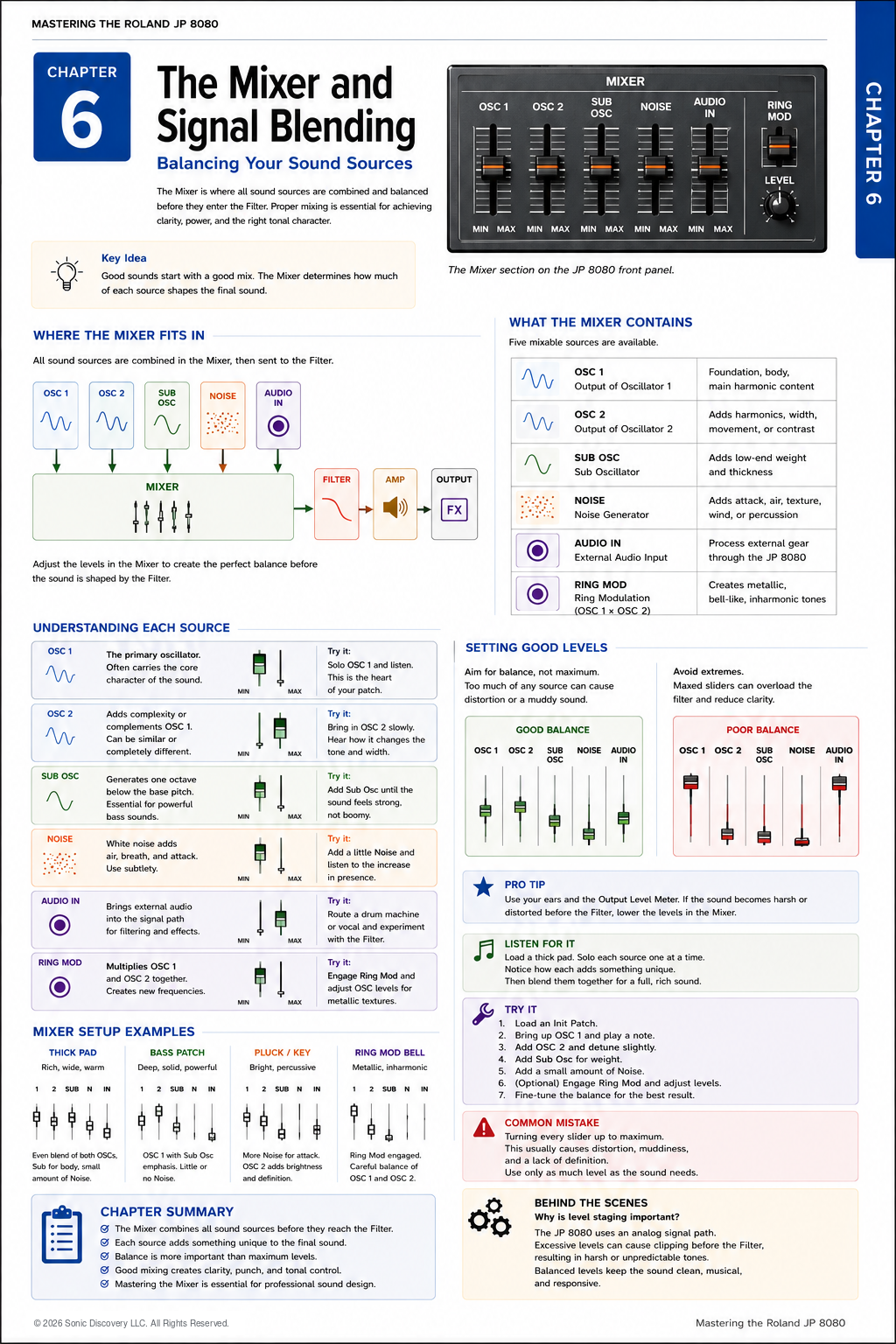
Every sound source eventually flows into the Mixer. The Mixer combines these signals into a single audio path before sending them to the Filter.
OSC 1, OSC 2, Sub Oscillator, Noise, and Audio Input feed the Mixer. The combined signal then continues through the Filter, Amplifier, Effects, and Output.
Because every source passes through the Mixer, it becomes the point where the overall tonal balance is established.
The Six Mixer Sources
The JP-8080 allows you to blend six different sound sources. Each contributes a unique sonic character.
OSC 1
OSC 1 is usually the primary sound source. Most Patches rely on OSC 1 to establish the core personality of the sound.
For many factory Patches, OSC 1 provides most of the harmonic content while the remaining sources enhance it.
Typical uses include:
- Saw wave leads
- Brass
- Pads
- Strings
- Basses
As a general rule, begin programming with OSC 1 by itself before adding additional sources.
OSC 2
OSC 2 expands the sound. It may duplicate OSC 1, complement it with another waveform, or interact with it through Hard Sync or Ring Modulation.
OSC 2 is commonly used to:
- Add harmonic richness.
- Increase stereo width through detuning.
- Create musical intervals.
- Introduce motion and complexity.
Although OSC 2 is often quieter than OSC 1, even a modest level can make a significant difference.
Sub Oscillator
The Sub Oscillator produces frequencies below the primary oscillators. Its purpose is not to attract attention, but to provide weight and foundation.
Without a Sub Oscillator, many bass sounds feel thin. With too much Sub Oscillator, however, the Patch can become muddy and overwhelm the mix.
A good Sub Oscillator should be felt as much as heard.
Noise Generator
The Noise Generator produces white noise. Unlike pitched oscillators, noise contains energy across the frequency spectrum.
Although it may seem insignificant, a small amount of noise can dramatically improve realism. Common applications include:
- Wind sounds
- Breath in synthetic choirs
- Percussion attacks
- Snare style Patches
- Analog texture
- Atmospheric effects
The most effective use of noise is often subtle.
Audio Input
The Audio Input allows external instruments to enter the JP-8080 synthesis engine. Instead of generating sound internally, the Mixer accepts an outside audio source and routes it through the Filter, Amplifier, Effects, and other processing stages.
Examples include:
- Drum machines
- Samplers
- Other synthesizers
- Vocals
- Guitar processors
This capability effectively transforms the JP-8080 into an external signal processor.
Ring Modulation
Ring Modulation is unique because it does not introduce an independent sound source. Instead, it mathematically combines OSC 1 and OSC 2 to create entirely new frequencies.
The resulting tones are often metallic, bell like, digital, experimental, or inharmonic. Small changes in oscillator tuning produce dramatic changes in Ring Modulation, so experimentation is encouraged.
Understanding Balance
One of the most common mistakes among beginning programmers is assuming that every level should be turned up. This rarely produces the best result.
Instead, think of the Mixer as balancing ingredients in a recipe. Too much of one ingredient hides the others. The same principle applies to synthesis.
A carefully balanced Patch often sounds larger than one with every control set near maximum.
Building a Balanced Patch
- Begin with OSC 1 only.
- Adjust its waveform and pitch.
- Introduce OSC 2 gradually.
- Add gentle detuning if desired.
- Blend in the Sub Oscillator only until the sound gains weight.
- Add a small amount of Noise if needed.
- Apply Ring Modulation only when the Patch calls for it.
Each new sound source should have a purpose. Avoid adding elements simply because they are available.
Level Staging
Professional sound designers pay close attention to signal levels throughout the synthesis process.
If the Mixer output becomes excessively strong before reaching the Filter, the sound may lose clarity. Although this is not clipping in the traditional digital sense, excessive levels can produce a congested, overly dense character that makes later processing less effective.
Maintaining balanced levels allows the Filter and Effects to respond more musically.
Listen for It
- Load an initialized Patch.
- Set OSC 1 to a Saw wave.
- Raise only OSC 1 and play several notes.
- Slowly raise OSC 2 while gently detuning it. Notice how the sound widens.
- Introduce the Sub Oscillator. Listen for added weight rather than obvious loudness.
- Add just enough Noise to hear a slight increase in presence.
The goal is not to identify each source individually. Instead, listen to how they combine into a single cohesive instrument.
Try It
Build four simple Patches using the Mixer.
| Patch | Mixer setup | Result |
|---|---|---|
| Thick Pad | OSC 1 Saw, OSC 2 Saw, gentle detune, moderate Sub Oscillator, and a small amount of Noise | A rich, warm pad with depth and width |
| Bass Patch | OSC 1 Square, emphasized Sub Oscillator, and very little Noise | A focused bass with solid low frequency support |
| Pluck | OSC 1 Saw, OSC 2 Square, and a small amount of Noise | Bright attack with clear definition |
| Ring Mod Bell | OSC 1 and OSC 2 active, Ring Modulation enabled, and careful oscillator tuning | Metallic, bell like textures suitable for experimental sounds |
Common Mistake
Many new programmers assume that louder always sounds better. As a result, every Mixer control is pushed near maximum.
The Patch becomes crowded, harsh, and difficult to control. Instead, use only as much of each sound source as necessary. A balanced Patch nearly always sounds more professional.
Programming Tip
One useful exercise is to solo each sound source mentally. Raise one source, listen carefully, lower it again, and repeat for every source.
Eventually, you will begin recognizing each component by ear. This skill becomes invaluable when programming original sounds.
Behind the Scenes
Why did Roland include such a flexible Mixer?
The Mixer allows the JP-8080 to behave more like a modular synthesizer while retaining the simplicity of a fixed signal path.
Rather than forcing every Patch to use identical sound sources, Roland gave programmers the freedom to determine exactly how much of each oscillator, the Sub Oscillator, Noise, Audio Input, and Ring Modulation contributes to the final sound.
This flexibility is one reason the instrument remains remarkably versatile despite its straightforward architecture.
Chapter Summary
- The Mixer combines all sound sources before filtering.
- Every source contributes something unique.
- Balance is more important than maximum volume.
- The Sub Oscillator adds weight.
- Noise adds texture and realism.
- Audio Input allows external processing.
- Ring Modulation creates new harmonic content.
- Great sounding Patches begin with thoughtful signal balance.