
JP-8080 guide / Chapter 07
The Filter
Filter types, cutoff, resonance, key follow, envelope depth, velocity, and practical tonal shaping.
Chapter 7
The Oscillators create the sound. The Filter gives it personality.
If the Oscillators provide the raw material for a Patch, the Filter is the sculptor that transforms it into something expressive and musical.
Few controls on the JP-8080 have as much influence over the character of a sound as the Filter. A slight adjustment to the Cutoff frequency can change a bright, energetic lead into a soft, mellow pad. Increasing Resonance can add focus, movement, and emotion. Combining the Filter with an Envelope or LFO brings the sound to life.
The Filter is often the section where a synthesizer begins to feel expressive rather than mechanical. Learning to use it well is one of the most valuable skills a synthesizer programmer can develop.
Unlike an equalizer, which is often used to make small tonal corrections, the Filter is a dynamic part of the synthesizer. It is designed to be played, automated, and continuously adjusted as part of the musical performance.
Where the Filter Fits
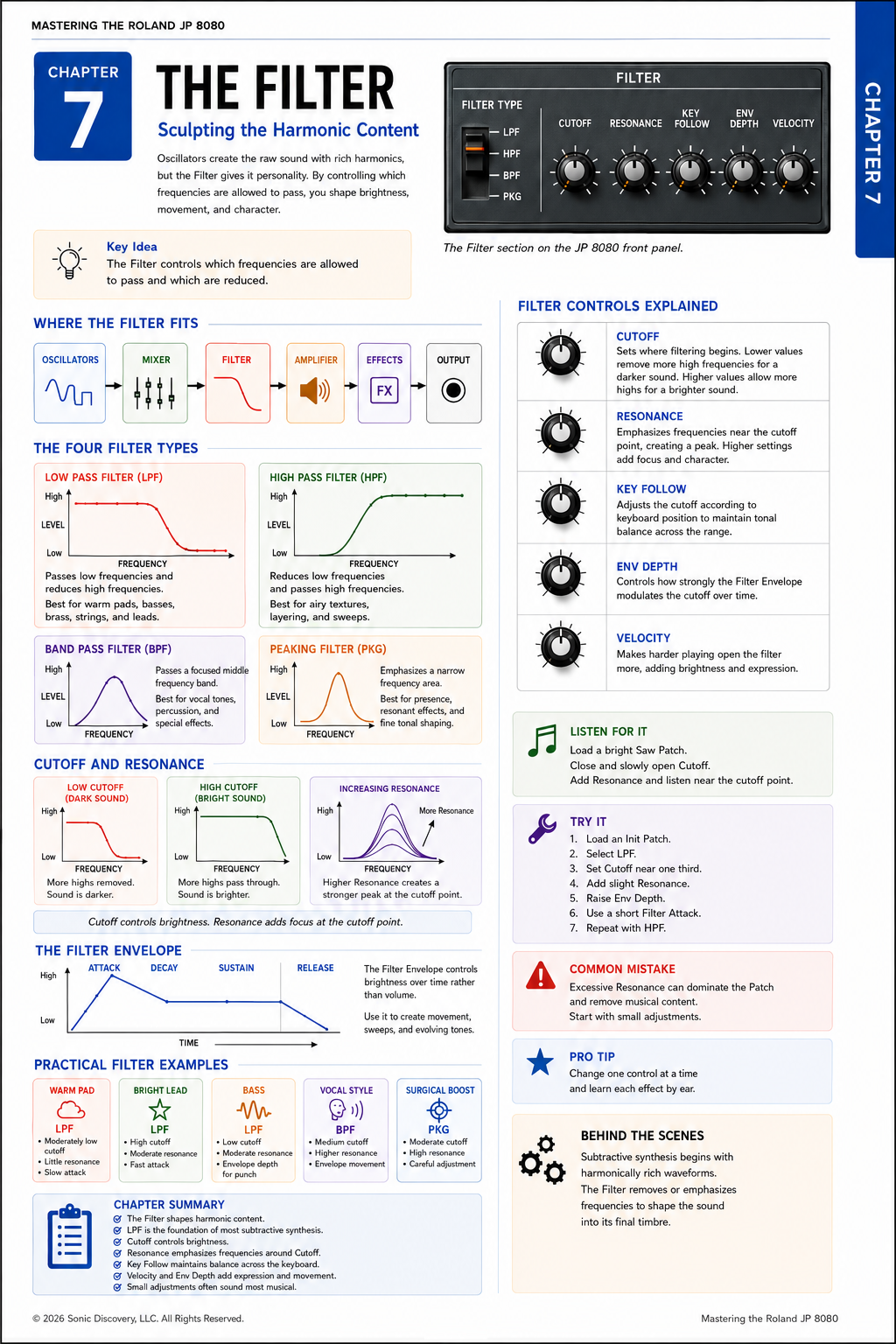
The Filter sits directly after the Mixer. Every sound source generated by the Oscillators, Sub Oscillator, Noise Generator, and Audio Input is blended together before entering the Filter.
The combined signal follows this path:
Oscillators to Mixer to Filter to Amplifier to Effects to Output.
This placement is important. Instead of filtering each oscillator separately, the JP-8080 filters the combined sound, allowing the entire Patch to respond as one cohesive instrument.
What Does a Filter Do?
Imagine listening to music from another room. The walls block many of the higher frequencies, creating a warmer, softer sound. Now imagine opening the door. More high frequencies reach your ears, and the sound immediately becomes brighter and clearer.
This is essentially what the Filter is doing. It controls how much of the harmonic content reaches the output.
The Oscillators continue producing the same waveforms, but the Filter determines how much of those harmonics remain audible.
The Four Filter Types
The JP-8080 provides four Filter modes, each designed for a different musical purpose.
| Filter type | What it does | Typical applications |
|---|---|---|
| Low Pass Filter | Allows lower frequencies to pass while gradually reducing higher frequencies. | Warm pads, analog strings, brass, synth basses, and trance leads |
| High Pass Filter | Allows higher frequencies to pass while reducing lower frequencies. | Removing excessive bass, airy textures, sweeping effects, and clean sound layering |
| Band Pass Filter | Allows a selected range of frequencies to pass while reducing frequencies above and below it. | Vocal style sounds, phasing effects, electronic percussion, and experimental textures |
| Peaking Filter | Emphasizes or reduces a narrow band while leaving the rest of the spectrum relatively unchanged. | Highlighting harmonics, adding presence, resonant effects, and fine tonal shaping |
Low Pass Filter
The Low Pass Filter is the type used most often in subtractive synthesis. Opening the Cutoff creates a brighter sound. Closing the Cutoff creates a warmer, darker sound.
High Pass Filter
Although used less frequently than the Low Pass Filter, the High Pass Filter is extremely valuable when creating evolving textures or making space for other sounds in a mix.
Band Pass Filter
Because only a narrow frequency band remains, movement created by the Envelope or LFO becomes especially noticeable. The result often has a focused, vocal quality.
Peaking Filter
Unlike the other Filter types, the Peaking Filter is designed more for emphasis than removal. It provides another creative option when designing unique sounds.
Understanding Cutoff
The Cutoff control determines where filtering begins. It is one of the most frequently adjusted controls on the entire synthesizer.
Lower Cutoff settings produce:
- Warm sounds
- Dark pads
- Soft textures
Higher Cutoff settings produce:
- Bright leads
- Crisp plucks
- Aggressive brass
- Open, airy sounds
Many performers adjust the Cutoff knob in real time because even small movements can dramatically change the emotional character of a Patch.
Understanding Resonance
Resonance emphasizes frequencies near the Cutoff point. Instead of simply reducing frequencies, Resonance adds focus to the edge of the Filter.
As Resonance increases:
- Sweeps become more dramatic.
- Harmonics become more pronounced.
- The Filter develops a distinctive peak.
At very high settings, the Filter may begin to self resonate, producing a musical tone even with little harmonic content from the Oscillators. Used tastefully, Resonance adds expression. Used excessively, it can overpower the Patch.
Key Follow
When you play higher notes on a keyboard, they naturally contain more high frequency energy. The Key Follow control allows the Filter to respond to keyboard position.
Higher notes can automatically open the Filter slightly while lower notes remain warmer. Without Key Follow, sounds may become dull in the upper register or excessively bright in the lower register.
Properly adjusted, Key Follow helps maintain a consistent tonal balance across the keyboard.
Envelope Depth
The Filter Envelope controls how the Cutoff changes over time. Envelope Depth determines how strongly that Envelope influences the Filter.
Small values create subtle movement. Large values create dramatic sweeps. Envelope Depth is one of the defining ingredients in classic analog synthesis.
Velocity Sensitivity
Velocity allows your playing dynamics to influence the Filter. Playing softly produces a gentler tone. Playing harder opens the Filter further, creating a brighter, more expressive sound.
This relationship between touch and tone makes the synthesizer feel much more like an acoustic instrument.
The Filter Envelope
The Filter Envelope follows the familiar ADSR model:
- Attack determines how quickly the brightness rises.
- Decay determines how quickly the Filter moves toward the Sustain level.
- Sustain establishes the brightness held while a note continues.
- Release determines how the Filter changes after the key is released.
Unlike the Amplifier Envelope, which controls loudness, the Filter Envelope controls brightness.
A slow Attack causes the sound to gradually become brighter. A short Decay creates a quick filter sweep. A lower Sustain keeps the tone warm while holding a note. A long Release allows the Filter to close gradually after the key is released.
Understanding the Filter Envelope is essential for creating expressive pads, brass, plucks, and evolving textures.
Practical Examples
| Sound | Filter settings | Result |
|---|---|---|
| Warm Pad | Low Pass, moderately low Cutoff, very little Resonance, and slow Filter Attack | A smooth, gentle sound that blooms naturally |
| Bright Lead | Low Pass, high Cutoff, moderate Resonance, and fast Attack | A cutting lead capable of standing out in a dense mix |
| Bass | Low Pass, low Cutoff, moderate Resonance, and Envelope Depth for punch | A focused, powerful bass with strong articulation |
| Vocal Style Patch | Band Pass, medium Cutoff, higher Resonance, and Envelope controlled movement | A vocal or phaser like texture |
| Surgical Boost | Peaking, moderate Cutoff, high Resonance, and careful adjustment | Added presence without dramatically changing the rest of the spectrum |
Listen for It
- Load a bright Saw wave Patch.
- Close the Cutoff until the sound becomes warm.
- Slowly open the Filter while holding a chord. Notice how additional harmonics gradually appear.
- Increase Resonance and listen to the frequencies surrounding the Cutoff point.
- Increase Envelope Depth and play short notes.
The Filter now becomes an active part of the performance rather than simply a tone control.
Try It
- Load an Init Patch.
- Select the Low Pass Filter.
- Lower the Cutoff to approximately one third of its range.
- Increase Resonance slightly.
- Raise Envelope Depth.
- Set a short Filter Attack.
- Play both single notes and chords.
- Repeat the exercise using the High Pass Filter and observe how differently the same Patch responds.
Common Mistake
Many new programmers assume that more Resonance always creates a better sound. In reality, excessive Resonance often removes too much of the musical content and causes the Filter peak to dominate the Patch.
Begin with small adjustments. Increase Resonance only until it enhances the sound. The goal is expression, not distraction.
Programming Tip
One of the best ways to learn the Filter is to make only one adjustment at a time. Move the Cutoff, listen, and return it. Increase Resonance and listen again.
Repeat this process until you can recognize each control by ear. Professional sound designers often rely on careful listening instead of numerical parameter values.
Behind the Scenes
Why is the Filter so important?
The Oscillators provide the raw harmonic content, but the Filter determines which portions of that content become part of the finished sound. This simple concept is the foundation of subtractive synthesis.
Rather than creating complexity through hundreds of Oscillators, the JP-8080 begins with harmonically rich waveforms and carefully removes or emphasizes frequencies until the desired timbre emerges.
Combined with Envelopes, LFOs, Velocity, and Key Follow, the Filter becomes one of the most expressive components of the entire synthesizer. This combination of warmth, responsiveness, and musical control has made the JP-8080 Filter one of its defining characteristics.
Chapter Summary
- The Filter shapes the harmonic content created by the Oscillators.
- The Low Pass Filter is the foundation of most subtractive synthesis.
- Cutoff controls brightness.
- Resonance emphasizes frequencies around the Cutoff point.
- Key Follow maintains tonal consistency across the keyboard.
- Velocity makes the Filter respond to your playing dynamics.
- Envelope Depth creates movement over time.
- Small adjustments often produce the most musical results.
- Mastering the Filter is one of the most important steps toward mastering the Roland JP-8080.