
JP-8080 guide / Chapter 25
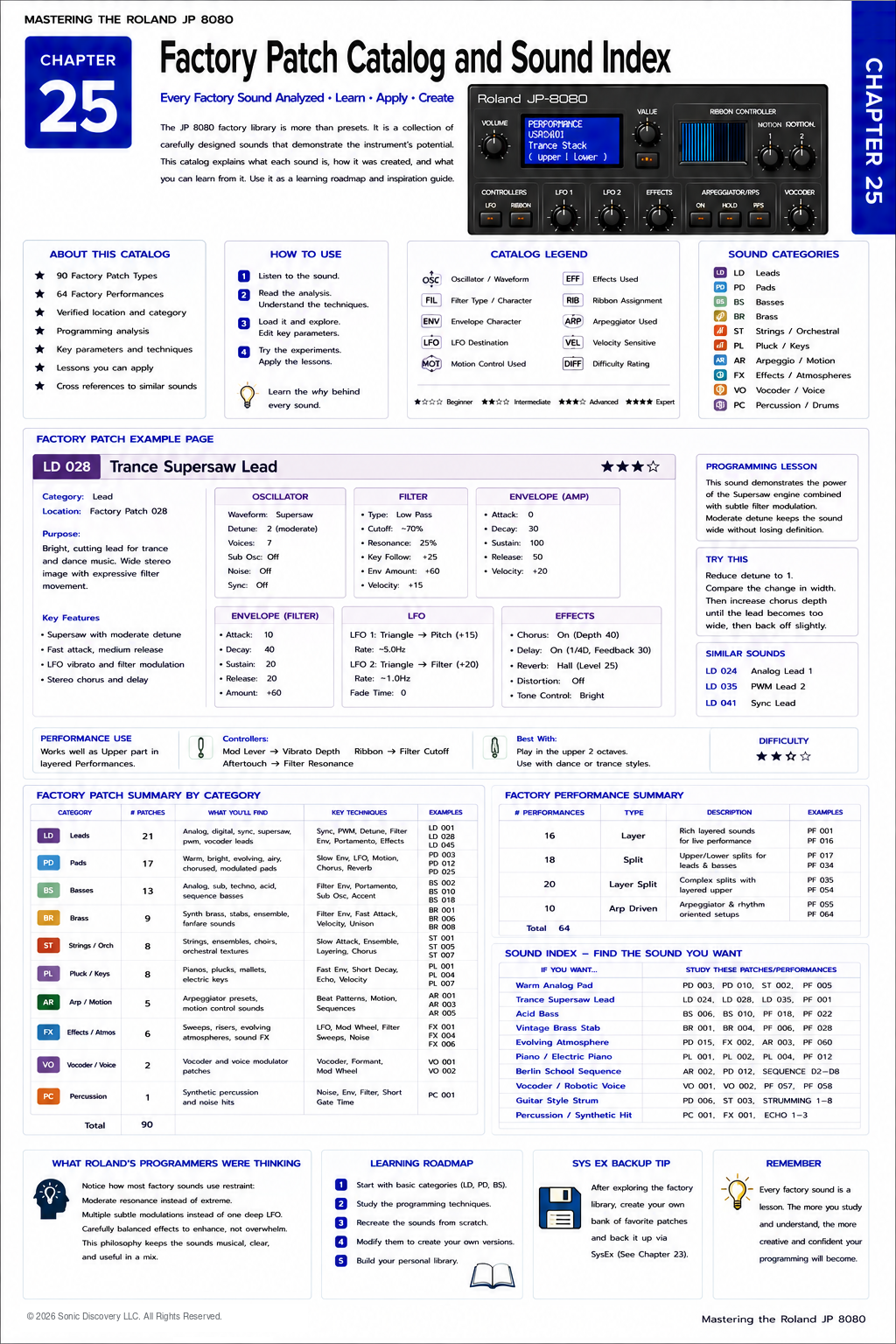
Factory Patch Catalog and Sound Index
Patch categories, catalog symbols, a complete example analysis, and a sound finding index.
Chapter 25
Every factory Patch is more than a preset. It is a lesson in synthesis.
The Roland JP-8080 factory library was never intended to be simply a collection of demonstration sounds. It was designed as a showcase of the instrument's synthesis engine, performance capabilities, and programming philosophy.
Many musicians browse the factory sounds looking for a useful lead or pad, then immediately begin editing. Experienced programmers approach the library differently.
They ask, “Why did Roland's programmers build the sound this way?”
That simple question transforms the factory library into one of the most valuable educational resources available for learning the JP-8080.
This chapter will teach you how to analyze every factory Patch and Performance, identify the synthesis techniques being demonstrated, and apply those ideas to your own programming.
Why Study Factory Sounds?
Every factory Patch demonstrates one or more programming concepts.
Examples include:
- Supersaw layering
- Filter Envelope shaping
- Pulse Width Modulation
- Oscillator Sync
- Motion Control
- Velocity response
- Stereo imaging
- Effects integration
- Performance layering
- Expressive controller assignments
Rather than copying a Patch exactly, learn the technique behind it.
Reading a Factory Patch
Whenever you load a factory Patch, follow the same evaluation process:
- Load the factory Patch.
- Play single notes.
- Play chords.
- Listen without Effects.
- Identify the Oscillator.
- Analyze the Filter.
- Observe the Envelopes.
- Identify the modulation.
- Study the performance controls.
- Identify the programming idea.
This workflow develops analytical listening skills and helps you understand how individual programming decisions shape the final sound.
Step One: Listen Before Editing
Play the Patch exactly as Roland programmed it.
Use:
- Soft velocity
- Hard velocity
- Low notes
- High notes
- Chords
- Single note melodies
Ask yourself what musical purpose the sound serves.
Examples include:
- Solo lead
- Layered pad
- Bass
- String ensemble
- Brass section
- Atmospheric texture
Avoid changing parameters until you have formed an impression of the original design.
Step Two: Identify the Oscillator Strategy
The Oscillator provides the harmonic foundation. Listen for clues.
Does the sound resemble:
- Saw
- Supersaw
- Square
- Triangle
- Pulse Width Modulation
- Oscillator Sync
- Noise
Remember that many factory sounds combine several Oscillator techniques. The goal is not to identify every detail immediately. The goal is to recognize the dominant character.
Step Three: Study the Filter
Ask whether the sound is naturally bright or whether the Filter is reducing upper harmonics.
Notice:
- Cutoff position
- Resonance
- Filter movement
- Velocity response
- Key Follow
Often the Filter contributes more personality than the Oscillator itself.
Step Four: Observe the Envelopes
The Envelope determines how the sound behaves over time.
Listen carefully. Does it:
- Start instantly?
- Fade in?
- Continue after key release?
- Decay quickly?
- Remain constant?
Imagine the sound as a performance rather than a collection of parameters.
Step Five: Analyze Modulation
Movement usually comes from several sources working together.
Listen for:
- LFO Pitch modulation
- Filter modulation
- Pulse Width movement
- Motion Control playback
- Ribbon assignments
- Velocity
- Modulation Lever response
Subtle modulation often contributes more realism than dramatic movement.
Step Six: Disable the Effects
One of the fastest ways to understand a Patch is to temporarily bypass its Effects.
Ask yourself whether the sound remains interesting. If the answer is yes, the underlying synthesis is strong. If not, the Effects may be carrying too much of the sound.
Roland generally built solid Patches before enhancing them with Chorus, Delay, or Reverb.
Understanding Factory Categories
The factory library is organized into broad musical categories. Each category emphasizes different synthesis techniques.
Leads
Typical Characteristics: Bright Oscillators, fast Attack, moderate Release, Pitch modulation, and Delay.
Skills Demonstrated: Oscillator selection, vibrato, and performance expression.
Pads
Typical Characteristics: Slow Attack, long Release, wide stereo image, and gentle modulation.
Skills Demonstrated: Envelope programming, Chorus, Motion Control, and layering.
Basses
Typical Characteristics: Fast Attack, controlled Release, strong Filter Envelope, and focused low frequencies.
Skills Demonstrated: Punch, Envelope shaping, and Sub Oscillator balance.
Brass
Typical Characteristics: Medium Attack, positive Filter Envelope, and velocity response.
Skills Demonstrated: Dynamic expression and Filter articulation.
Strings
Typical Characteristics: Ensemble style movement, slow Attack, and Chorus.
Skills Demonstrated: Stereo width, layering, and smooth modulation.
Effects
Typical Characteristics: Experimental modulation, Noise, Motion Control, and extreme Filters.
Skills Demonstrated: Creative sound design, controller assignments, and nontraditional synthesis.
Learning the Roland Philosophy
After studying dozens of factory sounds, several recurring design principles become apparent.
Principle One: Moderation
Roland programmers rarely maximize parameters. Instead, they combine many subtle adjustments.
Principle Two: Movement
Very few sounds remain completely static. Small LFO movements create life.
Principle Three: Balance
Oscillators, Filters, Envelopes, and Effects contribute equally. No single section dominates.
Principle Four: Playability
Factory sounds respond naturally to performance. Velocity, controllers, the Ribbon, and the Modulation Lever all contribute expression.
Factory Performance Analysis
Performances deserve just as much attention as individual Patches.
Instead of asking only which Patches are used, also ask why the two Patches were combined.
Observe:
- Upper Part
- Lower Part
- Layer balance
- Split point
- Controller assignments
- Motion Control
- Effects
Many Performance programming ideas can be applied to original creations.
Reverse Engineering
One of the best learning exercises is reconstruction.
- Load a factory Patch.
- Initialize another Patch.
- Attempt to recreate the original entirely by ear.
- Compare the result.
Notice which details were easy, which were difficult, and which programming decisions surprised you.
This develops synthesis skills far faster than memorizing parameter values.
Programming Lessons Hidden in the Factory Library
Every factory sound teaches something.
Bright Lead
A bright lead may demonstrate Oscillator Sync, Filter Envelope, and Delay timing.
Warm Pad
A warm pad may demonstrate slow Envelopes, Chorus, and Motion Control.
Bass
A bass may demonstrate Sub Oscillator balance, fast Attack, and controlled Release.
Think of every preset as a practical lesson.
Building Your Own Reference Library
As you explore the factory sounds, keep notes.
Record:
- Favorite Patches
- Interesting Filter settings
- Useful Motion Control ideas
- Ribbon assignments
- Performance combinations
Over time these observations become your personal programming handbook.
Listen For It
Choose three factory Patches from different categories, such as a Lead, Pad, and Bass. Play each for several minutes.
Identify:
- Oscillator
- Filter
- Envelope
- Modulation
- Effects
Do not enter Edit mode until you have formed your own conclusions.
Try It
Select one factory Pad and recreate it using only:
- One Oscillator
- One LFO
- No Effects
Compare your version with Roland's original. Notice how much of the musical character comes from careful programming rather than processing.
Common Mistake
Judging a Patch after only a few seconds.
Many factory sounds reveal their strengths only after exploring velocity, the Ribbon Controller, Motion Control, the Modulation Lever, and the keyboard range.
Take time to experience the complete design.
Pro Tip
Whenever you discover a programming idea you like, do not simply save the factory Patch under a new name.
Instead, recreate the idea inside a completely different Patch. This develops understanding rather than dependence.
Behind the Scenes
Thinking Like Roland's Sound Designers
The original JP-8080 sound designers worked under practical constraints. Factory sounds had to demonstrate the synthesizer's capabilities while remaining musically useful across many styles and performance situations.
This meant creating sounds that were expressive, reliable, and balanced rather than overly specialized. Many of the most effective factory Patches achieve their character through careful restraint: moderate Detune, subtle modulation, controlled Resonance, and Effects that enhance rather than dominate.
Studying these decisions reveals an important lesson. Great sound design is often the result of many thoughtful refinements instead of one dramatic setting.
Sound Design Roadmap
As your experience grows, begin recognizing factory sounds by programming technique instead of by name.
| If You Want to Create | Study These Concepts |
|---|---|
| Trance Leads | Supersaw, Detune, Delay, and Vibrato |
| Analog Brass | Saw Wave, Filter Envelope, and Velocity |
| Warm Pads | Slow Envelopes, Chorus, and Motion Control |
| Tight Basses | Sub Oscillator, fast Attack, and short Release |
| Atmospheric Textures | Noise, slow LFO, and long Reverb |
| Guitar Style Sounds | Arpeggiator Strumming and Velocity |
| Rhythmic Sequences | Beat Patterns, Motion Control, and Delay |
Your Personal Sound Journal
One of the most valuable habits you can develop is maintaining a programming journal.
For every original Patch you create, record:
- Musical objective
- Oscillator choice
- Filter approach
- Envelope strategy
- LFO assignments
- Motion Control ideas
- Effects used
- What worked well
- What you would improve
Over time, this journal becomes a personalized extension of this handbook and a record of your own growth as a synthesizer programmer.
Final Chapter Summary
The factory library is one of the greatest teachers built into the Roland JP-8080.
- Listen before editing.
- Study the programming concepts rather than copying settings.
- Analyze the interaction between Oscillators, Filters, Envelopes, modulation, and Effects.
- Treat every factory Patch as a lesson in synthesis.
- Recreate sounds by ear to strengthen your programming skills.
- Keep notes and build your own programming reference.
- Use the factory library as inspiration, not limitation.
Closing Thoughts
Mastering the Roland JP-8080 is not about memorizing every parameter or reproducing every factory preset. It is about understanding the relationships between sound, performance, and musical intent.
The factory library provides an extraordinary collection of examples, but your own creativity gives the instrument its true value. As you continue exploring, let the factory sounds serve as guides rather than destinations. Analyze them, learn from them, and then move beyond them to create sounds that are uniquely your own.
When you reach that point, you are no longer just operating the JP-8080. You are using it as its designers intended: as a flexible instrument for musical expression and discovery.