
JP-8080 guide / Chapter Reference
Memory Architecture Overview
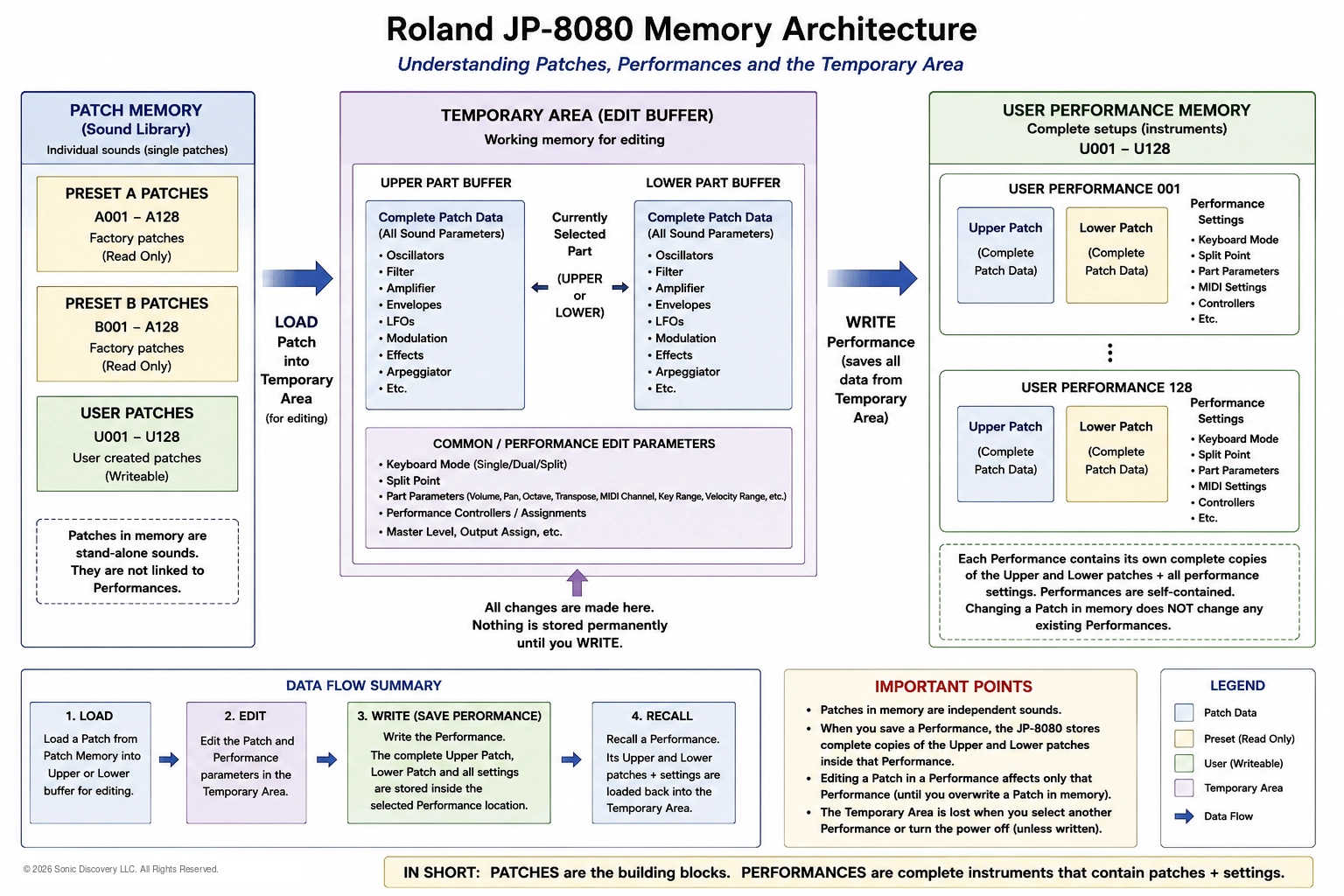
An illustrated data flow map of Patch memory, the Temporary Area, and User Performance memory.
Reference
Three places, one simple journey: load, edit, and write.
Earlier chapters introduced Patches, Performances, and the Temporary Area one at a time. This reference page brings them together into a single picture, so you can see exactly where a sound lives, where it goes when you edit it, and what happens when you save.
Once this map makes sense, nearly every memory question on the JP-8080 has a clear answer. Why did my edit disappear? Why did changing a Patch not change my Performance? Where did my new sound go? The diagram above answers all three.
Patch Memory: Your Sound Library
Patch memory holds individual sounds. Each Patch is a complete, stand alone sound with its own Oscillator, Filter, Amplifier, Envelope, LFO, and Effects settings.
- Preset Patches are the factory sounds. They are read only, so you can always return to them no matter how much you experiment.
- User Patches are your own sounds. There are 128 User locations, and each one can be written with a new or edited Patch.
Patches stored in memory are independent. They are not linked to any Performance, which is why changing one never affects a Performance you have already saved.
The Temporary Area: Your Workbench
The Temporary Area is the working memory where all editing takes place. When you select a sound, the JP-8080 copies it here, and everything you hear comes from this working copy.
It has room for a complete Performance at once:
- The Upper Part, holding a complete copy of the Upper Patch.
- The Lower Part, holding a complete copy of the Lower Patch.
- The Performance settings, such as how the two Parts are layered or split, the Split Point, Part levels and settings, MIDI settings, and controller assignments.
You choose which Part you are editing, Upper or Lower, and every knob you turn affects only that working copy. The stored versions stay exactly as they were until you decide to save.
User Performance Memory: Complete Instruments
User Performance memory stores your finished setups. There are 128 User Performance locations, and each one is completely self contained.
A saved Performance holds its own full copy of the Upper Patch, its own full copy of the Lower Patch, and all of its Performance settings. It does not point back to the Patches in Patch memory. That is the single most important thing to understand about JP-8080 memory.
Because of this, a Performance always sounds the way you saved it. You can edit or replace Patches in User Patch memory without changing any Performance that already uses a copy of them.
The Data Flow in Four Steps
- Load. Select a Patch or a Performance. The JP-8080 copies it into the Temporary Area, into the Upper Part, the Lower Part, or both.
- Edit. Change the Patch and Performance settings. All of the changes live only in the Temporary Area.
- Write. Press WRITE and choose a destination. Writing a Performance stores the complete Upper Patch, Lower Patch, and all settings inside the selected Performance location.
- Recall. Select the Performance again later. Its Patches and settings are copied back into the Temporary Area, ready to play or edit.
| Area | What it holds | Can you save to it? |
|---|---|---|
| Preset Patches | Factory sounds | No, read only |
| User Patches | Your own individual sounds, 128 locations | Yes, with WRITE |
| Temporary Area | The working copy of whatever you are playing or editing | Not permanently. It is replaced when you select another sound |
| User Performances | Complete setups with copies of two Patches plus all settings, 128 locations | Yes, with WRITE |
Important Points to Remember
- Patches in memory are independent sounds.
- Saving a Performance stores complete copies of its Upper and Lower Patches inside that Performance.
- Editing a Patch inside a Performance changes only that Performance, unless you also write the Patch to User Patch memory.
- Any unsaved edits in the Temporary Area are lost when you select another sound or switch off the power.
- Writing to a location replaces whatever was stored there before, so check the destination before you confirm.
In Short
Patch memory is your sound library. The Temporary Area is your workbench. User Performance memory is where finished instruments are kept. Sounds are copied onto the workbench to be played and edited, and they only become permanent when you press WRITE.