
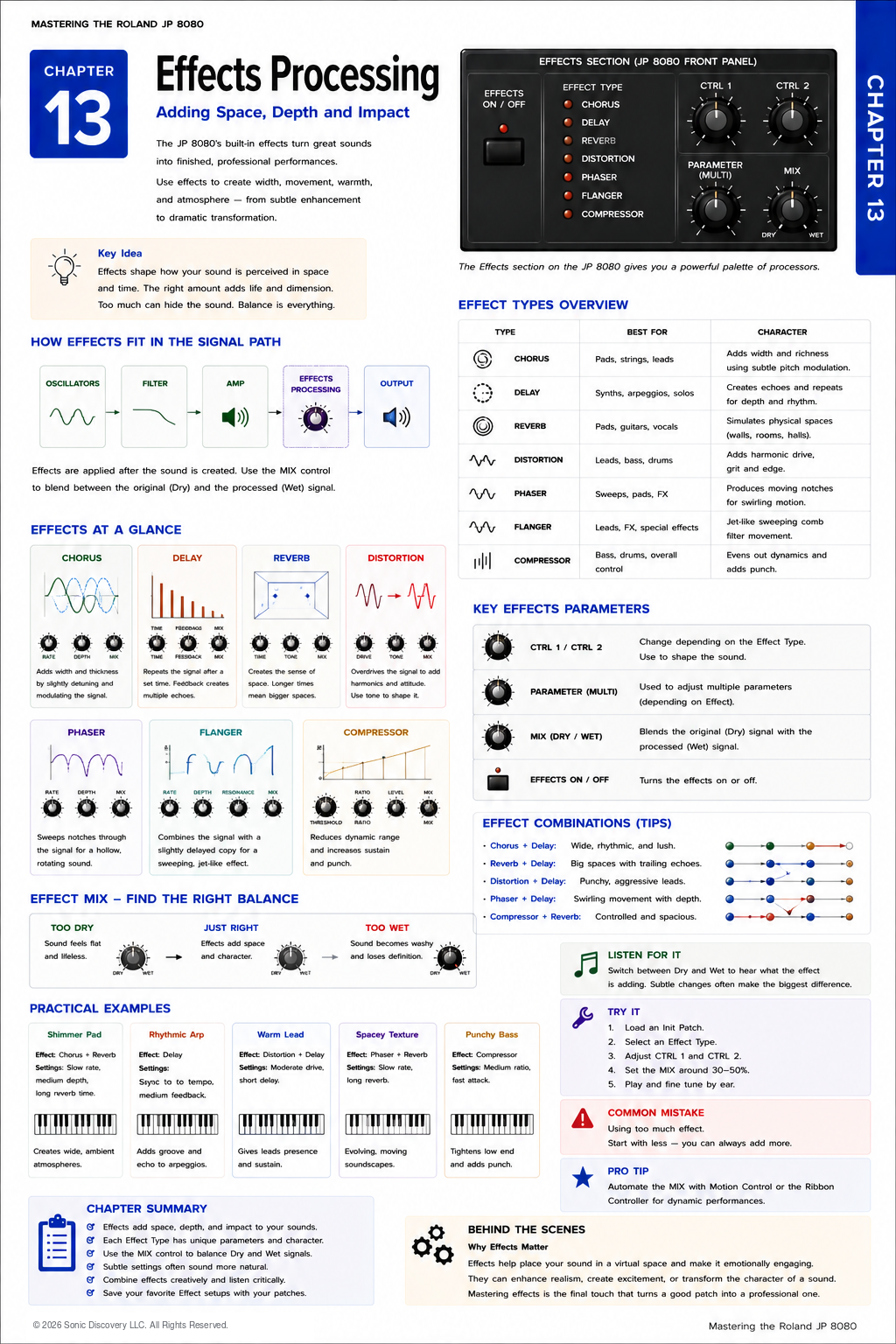
JP-8080 guide / Chapter 13
Effects Processing
Chorus, delay, reverb, distortion, phaser, flanger, compressor, and effect balance.
Chapter 13
A great synthesizer sound becomes unforgettable when it is placed in the right space.
Up to this point, we have focused on creating the sound itself. We have learned how Oscillators generate harmonics, how the Mixer blends sound sources, how the Filter shapes the tone, and how Envelopes, LFOs, Motion Control, the Ribbon Controller, and the Arpeggiator add movement and expression.
Now it is time for the final stage of the signal path: the Effects Processor.
Effects do not create the sound. They enhance it.
A small amount of Chorus can transform a simple saw wave into a lush pad. A carefully timed Delay can make a lead sound larger than life. Reverb places the sound into an acoustic space, while Distortion adds aggression and character.
Understanding when to use an effect is often more important than knowing how to use it. Professional programmers generally use effects to support a sound, not overwhelm it.
Think of the synthesizer as an actor. The Effects Processor is the stage on which that actor performs. The same performance feels completely different in a small room, a concert hall, or a cathedral.
Where Effects Fit
Effects are the final stage before the audio leaves the synthesizer.
- The Oscillators generate the raw sound.
- The Mixer blends the available sound sources.
- The Filter shapes the tone.
- The Amplifier controls the final level and contour.
- The Effects Processor adds space, depth, movement, or impact.
- The finished signal reaches the audio output.
The sound has already been created before it reaches the Effects section. Effects enhance the finished sound rather than generating it.
The JP-8080 Effects Section
The JP-8080 includes a versatile multi effects processor designed for both subtle enhancement and dramatic sound design. Each effect changes the listener's perception in a different way.
| Effect | What it does | Useful for | Listen for |
|---|---|---|---|
| Chorus | Creates slightly delayed and detuned copies | Pads, strings, Supersaw leads, and electric piano sounds | Width, warmth, and richness |
| Delay | Repeats the sound after a chosen interval | Leads, arpeggios, rhythmic phrases, and spacious textures | Clearly identifiable echoes |
| Reverb | Simulates reflections in an acoustic environment | Pads, atmospheres, vocals, and cinematic sounds | The impression of a room, hall, or larger space |
| Distortion | Adds harmonic content and saturation | Aggressive leads, powerful basses, industrial textures, and rock sounds | Energy, grit, and perceived loudness |
| Phaser | Shifts selected frequencies through moving phase relationships | Pads, strings, atmospheres, and vintage analog Patches | Smooth, swirling motion |
| Flanger | Combines the signal with a very short changing delay | Special effects, science fiction sounds, sweeping intros, and experimental textures | Metallic, hollow, or jet like movement |
| Compressor | Reduces the difference between loud and soft sounds | Bass, percussive Patches, and aggressive leads | Consistency, fullness, and controlled dynamics |
Chorus
Making One Sound Feel Like Many
Chorus creates the illusion that multiple instruments are playing simultaneously. It works by creating slightly delayed and slightly detuned copies of the original sound.
These copies constantly move relative to one another, creating width and richness. Small amounts of Chorus create warmth. Large amounts create lush, expansive textures.
One reason the JP-8080 became famous in trance music is the beautiful combination of the Supersaw Oscillator and Chorus.
Delay
Creating Echoes
Delay records the incoming sound and plays it back later. Unlike Reverb, which creates thousands of tiny reflections, Delay produces clearly identifiable repeats.
| Control | Purpose | Programming guidance |
|---|---|---|
| Delay Time | Determines how long it takes before the first repeat occurs | Short delays create thickness. Long delays create spacious echoes. |
| Feedback | Determines how many repeats occur | Low settings create one or two echoes. High settings continue much longer and can clutter a mix. |
| Effect Level | Controls how loudly the delayed signal is mixed with the original | Careful balance is essential for an effective Delay. |
Reverb
Placing the Sound in a Space
Reverb simulates sound reflecting from surfaces within an environment. Without Reverb, a synthesizer often sounds as though it exists in a vacuum.
Adding Reverb creates the illusion of physical space, such as a Small Room, Studio, Hall, Large Concert Hall, or Cathedral.
The larger the simulated space, the longer the reverberation continues. Pads often benefit from generous Reverb. Fast bass lines generally do not.
Distortion
Adding Harmonic Energy
Distortion intentionally alters the waveform by increasing harmonic content. It can produce aggressive leads, powerful basses, industrial textures, and rock influenced synthesizer sounds.
Small amounts add warmth. Large amounts create dramatic saturation.
Phaser
Sweeping Harmonics
The Phaser continuously shifts selected frequencies using moving phase relationships. The result is a smooth, swirling motion.
Phasers work particularly well on pads, strings, atmospheric sounds, and vintage analog Patches. Because the movement is subtle, Phaser is often more effective than dramatic.
Flanger
Metallic Motion
Flanging is created by mixing the original signal with a very short, continuously changing delay.
This produces a distinctive sweeping sound often described as metallic, jet like, hollow, or dramatic. Flangers are excellent for special effects, science fiction sounds, sweeping intros, and experimental textures.
Compressor
Controlling Dynamics
The Compressor reduces the difference between loud and soft sounds. This can make a Patch feel more consistent, fuller, and more powerful.
Compression is especially useful for bass, percussive Patches, and aggressive leads. Moderate compression generally sounds more natural than excessive compression.
Dry and Wet Mix
Nearly every effect includes some form of Mix control. This determines the balance between the Dry original sound and the Wet processed sound.
| Balance | What you hear | Typical result |
|---|---|---|
| Mostly Dry | The original sound remains dominant | Clear and direct, but the effect may be difficult to notice |
| Balanced | The original and processed signals support each other | Space and character without losing definition |
| Mostly Wet | The processed sound dominates | Dramatic, but it can overwhelm the original Patch |
Imagine adding seasoning to food. Too little may go unnoticed. Too much can overwhelm the original flavor. The same principle applies to effects.
Professional sound design often uses surprisingly conservative Mix settings.
Effect Order
Although the JP-8080 manages its internal routing automatically, it is useful to understand why effect order matters.
| Order | Result |
|---|---|
| Delay into Reverb | Echoes gradually fade into a larger acoustic space |
| Reverb into Delay | The entire reverberated sound repeats, often producing a less natural result |
| Distortion before Chorus | Harmonic richness is emphasized before width is added |
| Distortion after Chorus | The Distortion tends to reduce the width created by the Chorus |
Understanding these relationships helps explain why certain combinations sound more musical than others.
Combining Effects
The most impressive sounds usually rely on several subtle effects working together.
| Sound | Effects | Result |
|---|---|---|
| Supersaw Pad | Chorus, Delay, and Hall Reverb | Wide, lush, cinematic textures |
| Trance Lead | Delay, small Chorus, and light Distortion | A powerful lead with width and rhythmic repeats |
| Ambient Texture | Long Delay, Hall Reverb, and slow Phaser | An evolving atmospheric soundscape |
| Punchy Bass | Mild Distortion and light Compression | Strong low end with excellent definition |
Listen for It
- Load a simple Saw wave Patch.
- Play it with all effects disabled and notice how direct and dry it sounds.
- Enable Chorus and listen as the Patch becomes wider.
- Add a short Delay and notice the added depth.
- Introduce a moderate Hall Reverb.
- Listen as the Patch begins to occupy an acoustic space rather than sounding isolated.
Notice how each effect contributes something different.
Try It
- Load an initialized Patch.
- Select a Chorus effect.
- Set the Mix to approximately thirty percent.
- Play several sustained chords.
- Add a short Delay.
- Introduce a moderate Hall Reverb.
- Finally, reduce the Mix levels slightly.
Notice how the Patch often sounds more polished after reducing the amount of each effect.
Common Mistake
Many beginning programmers use far too much Reverb and Delay. Although impressive when listening alone, excessive effects often make a Patch lose clarity in a full musical arrangement.
Ask yourself: Does this effect improve the sound, or simply make it bigger?
A subtle enhancement usually survives the mix better than an exaggerated one.
Programming Tip
Program the Patch first. Add effects second.
Many experienced programmers temporarily disable all effects while designing the core sound. Once the Patch sounds strong by itself, they add only the effects needed to enhance it.
If a Patch depends entirely on effects, the underlying programming may need refinement.
Behind the Scenes
Why are onboard effects so important?
During the 1990s, many synthesizers relied on external rack mounted effects processors to create polished productions.
By integrating high quality digital effects into the JP-8080, Roland enabled performers to produce finished, performance ready sounds directly from the instrument. This streamlined workflow made the JP-8080 especially attractive for live musicians and studio producers alike.
The combination of Supersaw Oscillators, expressive modulation, and built in effects contributed significantly to the instrument's enduring popularity.
Creative Programming Ideas
| Patch idea | Programming elements | Result |
|---|---|---|
| Dream Pad | Chorus, Hall Reverb, slow LFO, and Motion Control on the Filter | A lush, cinematic pad with gentle movement |
| Classic Trance Lead | Supersaw Oscillator, Chorus, tempo synchronized Delay, and light Distortion | A wide, energetic lead capable of cutting through a dense mix |
| Space Sequence | Arpeggiator, Delay, Phaser, and long Reverb | A rhythmic sequence with evolving echoes and spacious ambience |
| Vintage Analog Brass | Mild Chorus, Small Room Reverb, Filter Envelope, and short Delay | A warm, expressive brass Patch inspired by classic analog synthesizers |
Chapter Summary
- Effects enhance the finished sound rather than creating it.
- Chorus adds width and richness.
- Delay creates rhythmic echoes.
- Reverb places the sound into an acoustic space.
- Distortion adds harmonic energy and character.
- Phaser and Flanger create movement and texture.
- Compression controls dynamics and adds consistency.
- The Dry and Wet Mix is just as important as the effect type.
- Subtle combinations of multiple effects usually sound more professional than excessive use of a single effect.
- A well programmed Patch should sound good before effects are added.